> ## Documentation Index
> Fetch the complete documentation index at: https://boxo.mintlify.site/llms.txt
> Use this file to discover all available pages before exploring further.
# Boxo Payments
## Introduction
Boxo Payments is an in-app payment functionality that enables host app users to complete payments for orders within the miniapp.
Here is a diagram illustrating the payment process for a miniapp order using the host app's payment system.
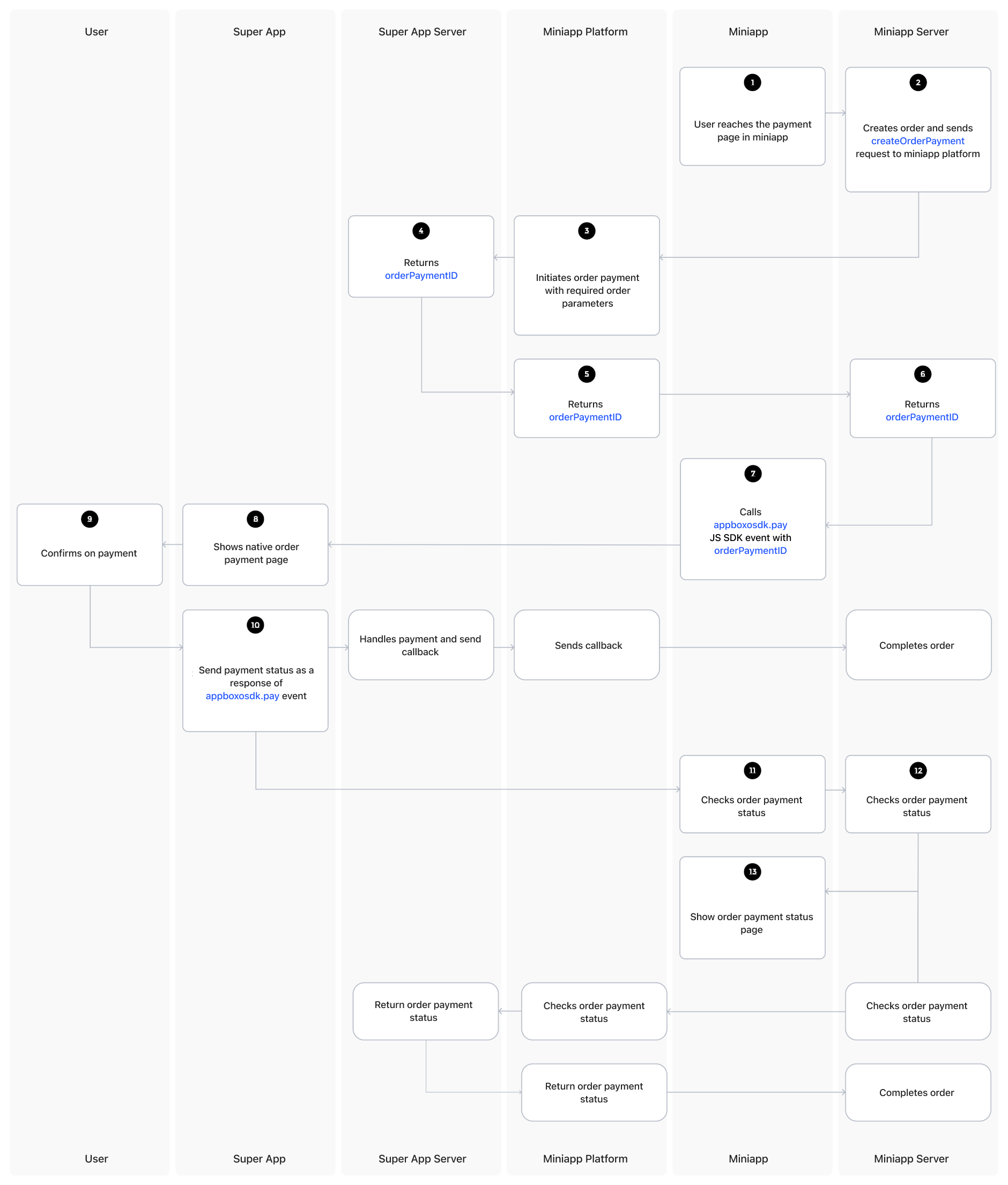 The user navigates to the payment page in the miniapp and initiates the creation of an order.
The miniapp server creates the order and sends a **createOrderPayment** request to the Boxo Platform.
The Boxo Platform initiates the order payment process on the host app server.
The host app server returns an **orderPaymentID** to the Boxo Platform.
The Boxo Platform then forwards the **orderPaymentID** to the miniapp server.
The miniapp server passes the **orderPaymentID** to the miniapp.
The miniapp forwards the **orderPaymentID** to the Boxo JS SDK's `pay` method.
The **Boxo Native SDK** captures the Boxo JS SDK's pay event (with the **orderPaymentID**) and displays a payment confirmation page to the user.
The user confirms the payment.
The host app processes the payment and sends the payment status as a response to the Boxo JS SDK pay event.
* During this process, the host app server sends a callback to the Boxo Platform, which updates the order status in the miniapp backend.
The miniapp processes the payment status received from the Boxo JS SDK event and confirms the order payment status on its server.
The miniapp finalizes the order payment status.
* If the order is still processing at this stage, the miniapp will request the payment status from the Boxo Platform, which, in turn, will query the host app server for an update.
Finally, the miniapp displays the order payment status page to the user.
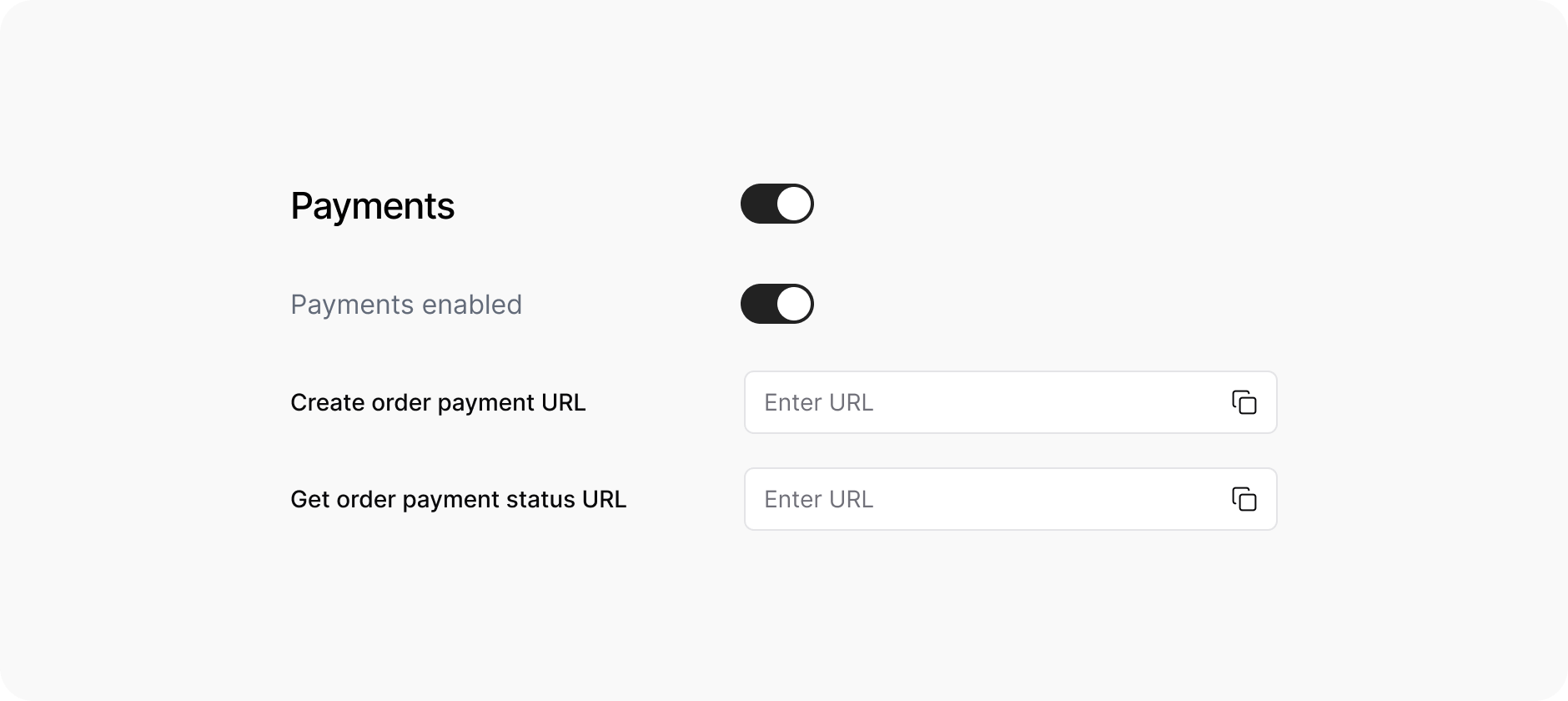
\*Note: Feature must be enabled in [Dashboard Partnership](https://dashboard.boxo.io/partnerships/)
The user navigates to the payment page in the miniapp and initiates the creation of an order.
The miniapp server creates the order and sends a **createOrderPayment** request to the Boxo Platform.
The Boxo Platform initiates the order payment process on the host app server.
The host app server returns an **orderPaymentID** to the Boxo Platform.
The Boxo Platform then forwards the **orderPaymentID** to the miniapp server.
The miniapp server passes the **orderPaymentID** to the miniapp.
The miniapp forwards the **orderPaymentID** to the Boxo JS SDK's `pay` method.
The **Boxo Native SDK** captures the Boxo JS SDK's pay event (with the **orderPaymentID**) and displays a payment confirmation page to the user.
The user confirms the payment.
The host app processes the payment and sends the payment status as a response to the Boxo JS SDK pay event.
* During this process, the host app server sends a callback to the Boxo Platform, which updates the order status in the miniapp backend.
The miniapp processes the payment status received from the Boxo JS SDK event and confirms the order payment status on its server.
The miniapp finalizes the order payment status.
* If the order is still processing at this stage, the miniapp will request the payment status from the Boxo Platform, which, in turn, will query the host app server for an update.
Finally, the miniapp displays the order payment status page to the user.
\*Note: Feature must be enabled in [Dashboard Partnership](https://dashboard.boxo.io/partnerships/)
 **Data format**
Currently, JSON is used for data exchange. Decimal values can be represented as floats, numbers, or strings, with a maximum of 20 digits in total and up to 2 digits after the decimal point. String size limits are defined within the data type specifications.
This endpoint allows the Boxo Platform to create an order payment (refer to Step 3 in the diagram).
**URL and METHOD:**
This endpoint must handle a HTTPS POST request
URL to endpoint must be provided in [Dashboard](https://dashboard.boxo.io/host-apps/)
**Data format**
Currently, JSON is used for data exchange. Decimal values can be represented as floats, numbers, or strings, with a maximum of 20 digits in total and up to 2 digits after the decimal point. String size limits are defined within the data type specifications.
This endpoint allows the Boxo Platform to create an order payment (refer to Step 3 in the diagram).
**URL and METHOD:**
This endpoint must handle a HTTPS POST request
URL to endpoint must be provided in [Dashboard](https://dashboard.boxo.io/host-apps/)
 **Headers:**
| Key | Value |
| --------------- | --------------------------------------------------------------------------------------------------------------------------------------------------------------- |
| `Authorization` | ` ` or token from [Get access token](/host-apps/BoxoConnect#get-access-token) can be used instead |
| `Content-type` | `application/json` |
| `X-User-ID` | `` |
* Default ``: `Token`. Access token prefix can be set in [Boxo Connect](https://dashboard.boxo.io/host-apps/).
* To use user access token from Boxo Connect as authorization token enable `Use access token` in [Dashboard](https://dashboard.boxo.io/host-apps/).
* `hostapp_client_id` and `hostapp_secret_key` must be provided in [Dashboard](https://dashboard.boxo.io/host-apps/)
**Body**
| Field | Data type | Description |
| -------- | ------------ | -------------------------------------- |
| `app_id` | String | Miniapp identifier |
| `order` | OrderDetails | Order info (amount, currency and etc.) |
**OrderDetails:**
| Field | Data type | Optional | Description |
| ------------------- | ------------ | -------- | ------------------------------------------------------------------ |
| `currency` | String(20) | No | Currency code for the order (e.g., 'USD') |
| `amount` | Decimal | No | Total order amount (decimal with 2 decimal places) |
| `subtotal_amount` | Decimal | Yes | Subtotal before taxes and shipping (decimal with 2 decimal places) |
| `shipping_amount` | Decimal | Yes | Shipping cost (decimal with 2 decimal places) |
| `discount_amount` | Decimal | Yes | Total discount applied (decimal with 2 decimal places) |
| `tax_title` | String(250) | Yes | Title/name of the tax |
| `tax_amount` | Decimal | Yes | Tax amount (decimal with 2 decimal places) |
| `taxes_included` | Boolean | Yes | Boolean indicating if taxes are included in the price |
| `note` | Text | Yes | Additional notes for the order |
| `custom_attributes` | JSON | Yes | JSON field for custom order attributes |
| `miniapp_order_id` | String(255) | Yes | Order ID from the miniapp side |
| `hostapp_user_id` | String(255) | Yes | User ID from the host app |
| `items` | OrderItem\[] | Yes | List of order items (see OrderItem below) |
| `shipping_address` | Object | Yes | Shipping address details (see OrderShippingAddress below) |
**OrderItem:**
| Field | Data type | Optional | Description |
| ---------------------- | ----------- | -------- | ------------------------------------------------- |
| `product_name` | String(250) | No | Name of the product |
| `product_variant_name` | String(250) | No | Product variant name |
| `product_sku` | String(250) | No | Product SKU/identifier |
| `product_image_url` | String(500) | No | URL to product image |
| `quantity` | Integer | No | Quantity of the product (positive integer) |
| `price` | Decimal | No | Price per item (decimal with 2 decimal places) |
| `discount` | Decimal | No | Discount per item (decimal with 2 decimal places) |
**OrderShippingAddress:**
| Field | Data type | Optional | Description |
| --------------- | ------------ | -------- | ----------------------------------------------------- |
| `address1` | String(1000) | Yes | Primary address line |
| `address2` | String(1000) | Yes | Secondary address line |
| `first_name` | String(250) | Yes | First name |
| `last_name` | String(250) | Yes | Last name |
| `phone` | String(250) | Yes | Phone number |
| `region_name` | String(100) | Yes | Region/state name |
| `region_code` | String(100) | Yes | Region/state code |
| `province_name` | String(250) | Yes | Province name |
| `province_code` | String(250) | Yes | Province code |
| `city` | String(250) | Yes | City name |
| `country` | String(250) | Yes | Country name |
| `postal_code` | String(250) | Yes | Postal/ZIP code |
| `latitude` | Decimal | Yes | Geographic latitude (-90 to 90, 15 decimal places) |
| `longitude` | Decimal | Yes | Geographic longitude (-180 to 180, 15 decimal places) |
**Response:**
* Response status must be `200` in all cases
* Response body:
| Field | Data type | Optional | Description |
| ------------------- | ----------- | -------------------------------- | ------------------------------------------------------------------------------------------------------------------------------------------------------------------ |
| `order_payment_id` | String(250) | No, except `error_code` provided | Order payment identifier |
| `error_code` | String | Yes | If some error is occured error code should be provided. Example: `{"error_code": "INVALID_ORDER_DATA"}` All error codes can be found [here](/host-apps/ErrorCodes) |
| `custom_attributes` | JSON | Yes | JSON field for custom order attributes |
**Request Example:**
```
curl --location --request POST '[YOUR_SERVER_URL]/api/create-order-payment/'\
--header 'Content-Type: application/json' \
--header 'Authorization: Basic {{BASE64_ENCODED_CLIENT_ID_AND_CLIENT_SECRET}}' \
--data-raw '{ "app_id": "{{MINIAPP_ID}}", "order": {
"amount": "100.00",
"currency": "USD",
"miniapp_order_id": "{{ MINIAPP_ORDER_ID }}",
"hostapp_user_id": "{{ HOSTAPP_USER_ID }}"
}}'
```
This endpoint is for Boxo platform to get order payment status
**URL and METHOD**
This endpoint must handle a HTTPS POST request
Can be configured to be a GET method
URL to endpoint must be provided in [Dashboard](https://dashboard.boxo.io/host-apps/)
**Headers**
| Key | Value |
| --------------- | --------------------------------------------------------------------------------------------------------------------------------------------------------------- |
| `Authorization` | ` ` or token from [Get access token](/host-apps/BoxoConnect#get-access-token) can be used instead |
| `Content-type` | `application/json` |
| `X-User-ID` | `` |
Default ``: `Token`. Access token prefix can be set in [Boxo Connect](https://dashboard.boxo.io/host-apps/).
To use user access token from Boxo Connect as authorization token enable `Use access token` in [Dashboard](https://dashboard.boxo.io/host-apps/).
`hostapp_client_id` and `hostapp_secret_key` must be provided in [Dashboard](https://dashboard.boxo.io/host-apps/)
**Body**
| Field | Data type | Description |
| ------------------ | --------- | ------------------------ |
| `app_id` | String | Miniapp identifier |
| `client_id` | String | Hostapp identifier |
| `order_payment_id` | String | Order payment identifier |
**Response**
* Response status must be `200` in all cases
* Response body
| Field | Data type | Optional | Description |
| --------------------- | ----------- | :------------------------------- | --------------------------------------------------------------------------------------------------------------------------------------------------------------- |
| `app_id` | String | No, except `error_code` provided | Miniapp identifier |
| `client_id` | String | No, except `error_code` provided | Hostapp identifier |
| `order_payment_id` | String | No, except `error_code` provided | Order payment identifier |
| `payment_status` | String(100) | No, except `error_code` provided | Order payment status: `in_process`, `paid`, `cancelled`, `failed` |
| `payment_fail_reason` | String | Yes | Order payment fail reason |
| `custom_attributes` | JSON | Yes | JSON field for custom order attributes |
| `error_code` | String | Yes | If some error is occured error code should be provided. Example: `{"error_code": "ORDER_NOT_FOUND"}` All error codes can be found [here](/host-apps/ErrorCodes) |
**Request Example**
```
curl --location --request POST '[YOUR_SERVER_URL]/api/get-order-payment-status/'\
--header 'Content-Type: application/json' \
--header 'Authorization: Basic {{BASE64_ENCODED_CLIENT_ID_AND_CLIENT_SECRET}}' \
--data-raw '{ "app_id": "{{MINIAPP_ID}}", "client_id": "{{CLIENT_ID}}", "order_payment_id": "{{ORDER_PAYMENT_ID}}"}'
```
This endpoint is part of the Boxo Platform. It sends a request to the miniapp server to complete the order payment after the payment has been processed (refer to the step after 10 in the diagram).
**URL and METHOD**
This is HTTPS POST `/api/v1/orders/complete-order/` endpoint
IP address of requesting services must be provided in [Dashboard](https://dashboard.boxo.io/host-apps/) for whitelisting or [Request Signaturing](/host-apps/Signaturing) must be enabled
**Headers**
| Key | Value |
| ------------ | ---------------- |
| Content-type | application/json |
**Body**
| Field | Data type | Optional | Description |
| --------------------- | ----------- | -------- | ----------------------------------------------------------------- |
| `order_payment_id` | String(250) | No | Order payment identifier |
| `app_id` | String | No | Miniapp identifier |
| `client_id` | String | No | Hostapp identifier |
| `payment_status` | String(100) | No | Order payment status: `in_process`, `paid`, `cancelled`, `failed` |
| `payment_fail_reason` | String | Yes | Order payment fail reason |
| `custom_attributes` | JSON | Yes | Order custom attributes |
**Response:**
* Response status will be `400` in case there is error\_code
* Response body:
| Field | Data type | Description |
| -------------- | --------- | -------------------------------------------------------------------------------- |
| code | String | Request result code example: `SUCCESS` |
| message | String | Result message |
| error\_code | String | Error code |
| error\_message | String | Result error message. All error codes can be found [here](/host-apps/ErrorCodes) |
**Request Example**
```
curl --location --request POST '[BOXO_PLATFORM_SERVER_URL]/api/v1/orders/complete-order/' \
--header 'Content-Type: application/json' \
--data-raw '{
"order_payment_id": "{{ORDER_PAYMENT_ID}}",
"payment_status": "paid",
"client_id": "{{CLIENT_ID}}",
"app_id": "{{MINIAPP_ID}}"
}'
```
**Response Example**
```
{
"code": "SUCCESS",
"message": "Success"
}
```
```
{
"error_code": "ORDER_NOT_FOUND",
"error_message": "No Order matches the given query."
}
```
Listening for Payment event
```swift theme={"system"}
miniapp.delegate = self
...
extension ViewController : MiniappDelegate {
func didReceivePaymentEvent(miniapp: Miniapp, paymentData: PaymentData) {
// Show payment processing screen and handle payment according to paymentData
// paymentData.amount
// paymentData.miniappOrderId
// paymentData.currency
// paymentData.orderPaymentId
// Once payment is done, modify payment data and send result to mini app:
paymentData.status = "success" // change the payment status. "failed" in case payment failed, "cancelled" in case payment cancelled
miniapp.sendPaymentEvent(paymentData: paymentData)
}
}
```
Kotlin
```kotlin theme={"system"}
Boxo.getMiniapp("[APP_ID]")
.setPaymentEventListener { _, miniapp, paymentData ->
// Show payment processing screen and handle payment according to paymentData
// paymentData.amount
// paymentData.miniappOrderId
// paymentData.currency
// paymentData.orderPaymentId
// Once payment is done, modify payment data and send result to mini app:
paymentData.status = "success" // change the payment status. "failed" in case payment failed, "cancelled" in case payment cancelled
miniapp.sendPaymentResult(paymentData)
}.open()
```
```dart theme={"system"}
@override
void initState() {
paymentSubscription = Boxo.paymentEvents().listen((PaymentEvent payment) async {
Boxo.hideMiniapps(); // need to hide the miniapp before showing the payment page or popup
// Show payment processing screen and handle payment according to paymentData
// payment.amount
// payment.miniappOrderId
// payment.currency
// payment.orderPaymentId
// Once payment is done, modify payment data and send result to miniapp:
NDialog(
dialogStyle: DialogStyle(titleDivider: true),
title: Text("Payment"),
content: Text("Confirm payment"),
actions: [
TextButton(
child: Text("Confirm"),
onPressed: () {
Navigator.pop(context);
//.. send request to handle payment to your backend
payment.status = 'success'; // change the payment status. "failed" in case payment failed, "cancelled" in case payment cancelled
Boxo.sendPaymentEvent(payment); // send payment result to miniapp
Boxo.openMiniapp(payment.appId); // need to open the miniapp
}),
TextButton(
child: Text("Cancel"),
onPressed: () {
Navigator.pop(context);
payment.status = 'cancelled';
Boxo.sendPaymentEvent(payment);
Boxo.openMiniapp(payment.appId);
}),
],
).show(context);
});
Boxo.openMiniapp('[APP_ID]');
super.initState();
}
```
```js theme={"system"}
useEffect(() => {
const paymentEventsSubscription = Boxo.paymentEvents.subscribe(
(event) => {
// hide miniapp to return to the react-native app page
Boxo.hideMiniapps();
//payment data
const appId = event.app_id;
const paymentEvent = event.payment_event;
const orderPaymentId = paymentEvent.order_payment_id;
const amount = paymentEvent.amount;
const currency = paymentEvent.currency;
const extraParams = paymentEvent.extra_params;
// display payment screen
// after payment is completed
// open hidden miniapp
Boxo.openMiniapp(appId);
//send payment result to miniapp
const newEvent = {
app_id: appId,
payment_event: {
...event.payment_event,
status: // change the payment status. "failed" in case payment failed, "cancelled" in case payment cancelled
},
};
Boxo.paymentEvents.send(newEvent);
},
() => {},
);
return () => {
...
paymentEventsSubscription();
};
}, []);
```
```js theme={"system"}
Boxo.addListener('payment_event', paymentData => {
Boxo.hideMiniapps();
// Show payment processing screen and handle payment according to paymentData
// paymentData.amount
// paymentData.miniappOrderId
// paymentData.currency
// paymentData.orderPaymentId
// Once payment is done, modify payment data and send result to mini app:
paymentData.status = 'success'; // change the payment status. "failed" in case payment failed, "cancelled" in case payment cancelled
Boxo.sendPaymentEvent(paymentData);
Boxo.openMiniapp({ paymentData.appId });
});
```
```js theme={"system"}
Boxo.addPaymentEventListener((paymentData) => {
// Show payment processing screen and handle payment according to paymentData
// paymentData.amount
// paymentData.miniappOrderId
// paymentData.currency
// paymentData.orderPaymentId
// Once payment is done, modify payment data and send result to mini app:
Boxo.hideMiniapps();
paymentData.status = "success"; // change the payment status. "failed" in case payment failed, "cancelled" in case payment cancelled
Boxo.sendPaymentEvent(paymentData);
Boxo.openMiniapp({ appId: paymentData.appId })
});
```
**Headers:**
| Key | Value |
| --------------- | --------------------------------------------------------------------------------------------------------------------------------------------------------------- |
| `Authorization` | ` ` or token from [Get access token](/host-apps/BoxoConnect#get-access-token) can be used instead |
| `Content-type` | `application/json` |
| `X-User-ID` | `` |
* Default ``: `Token`. Access token prefix can be set in [Boxo Connect](https://dashboard.boxo.io/host-apps/).
* To use user access token from Boxo Connect as authorization token enable `Use access token` in [Dashboard](https://dashboard.boxo.io/host-apps/).
* `hostapp_client_id` and `hostapp_secret_key` must be provided in [Dashboard](https://dashboard.boxo.io/host-apps/)
**Body**
| Field | Data type | Description |
| -------- | ------------ | -------------------------------------- |
| `app_id` | String | Miniapp identifier |
| `order` | OrderDetails | Order info (amount, currency and etc.) |
**OrderDetails:**
| Field | Data type | Optional | Description |
| ------------------- | ------------ | -------- | ------------------------------------------------------------------ |
| `currency` | String(20) | No | Currency code for the order (e.g., 'USD') |
| `amount` | Decimal | No | Total order amount (decimal with 2 decimal places) |
| `subtotal_amount` | Decimal | Yes | Subtotal before taxes and shipping (decimal with 2 decimal places) |
| `shipping_amount` | Decimal | Yes | Shipping cost (decimal with 2 decimal places) |
| `discount_amount` | Decimal | Yes | Total discount applied (decimal with 2 decimal places) |
| `tax_title` | String(250) | Yes | Title/name of the tax |
| `tax_amount` | Decimal | Yes | Tax amount (decimal with 2 decimal places) |
| `taxes_included` | Boolean | Yes | Boolean indicating if taxes are included in the price |
| `note` | Text | Yes | Additional notes for the order |
| `custom_attributes` | JSON | Yes | JSON field for custom order attributes |
| `miniapp_order_id` | String(255) | Yes | Order ID from the miniapp side |
| `hostapp_user_id` | String(255) | Yes | User ID from the host app |
| `items` | OrderItem\[] | Yes | List of order items (see OrderItem below) |
| `shipping_address` | Object | Yes | Shipping address details (see OrderShippingAddress below) |
**OrderItem:**
| Field | Data type | Optional | Description |
| ---------------------- | ----------- | -------- | ------------------------------------------------- |
| `product_name` | String(250) | No | Name of the product |
| `product_variant_name` | String(250) | No | Product variant name |
| `product_sku` | String(250) | No | Product SKU/identifier |
| `product_image_url` | String(500) | No | URL to product image |
| `quantity` | Integer | No | Quantity of the product (positive integer) |
| `price` | Decimal | No | Price per item (decimal with 2 decimal places) |
| `discount` | Decimal | No | Discount per item (decimal with 2 decimal places) |
**OrderShippingAddress:**
| Field | Data type | Optional | Description |
| --------------- | ------------ | -------- | ----------------------------------------------------- |
| `address1` | String(1000) | Yes | Primary address line |
| `address2` | String(1000) | Yes | Secondary address line |
| `first_name` | String(250) | Yes | First name |
| `last_name` | String(250) | Yes | Last name |
| `phone` | String(250) | Yes | Phone number |
| `region_name` | String(100) | Yes | Region/state name |
| `region_code` | String(100) | Yes | Region/state code |
| `province_name` | String(250) | Yes | Province name |
| `province_code` | String(250) | Yes | Province code |
| `city` | String(250) | Yes | City name |
| `country` | String(250) | Yes | Country name |
| `postal_code` | String(250) | Yes | Postal/ZIP code |
| `latitude` | Decimal | Yes | Geographic latitude (-90 to 90, 15 decimal places) |
| `longitude` | Decimal | Yes | Geographic longitude (-180 to 180, 15 decimal places) |
**Response:**
* Response status must be `200` in all cases
* Response body:
| Field | Data type | Optional | Description |
| ------------------- | ----------- | -------------------------------- | ------------------------------------------------------------------------------------------------------------------------------------------------------------------ |
| `order_payment_id` | String(250) | No, except `error_code` provided | Order payment identifier |
| `error_code` | String | Yes | If some error is occured error code should be provided. Example: `{"error_code": "INVALID_ORDER_DATA"}` All error codes can be found [here](/host-apps/ErrorCodes) |
| `custom_attributes` | JSON | Yes | JSON field for custom order attributes |
**Request Example:**
```
curl --location --request POST '[YOUR_SERVER_URL]/api/create-order-payment/'\
--header 'Content-Type: application/json' \
--header 'Authorization: Basic {{BASE64_ENCODED_CLIENT_ID_AND_CLIENT_SECRET}}' \
--data-raw '{ "app_id": "{{MINIAPP_ID}}", "order": {
"amount": "100.00",
"currency": "USD",
"miniapp_order_id": "{{ MINIAPP_ORDER_ID }}",
"hostapp_user_id": "{{ HOSTAPP_USER_ID }}"
}}'
```
This endpoint is for Boxo platform to get order payment status
**URL and METHOD**
This endpoint must handle a HTTPS POST request
Can be configured to be a GET method
URL to endpoint must be provided in [Dashboard](https://dashboard.boxo.io/host-apps/)
**Headers**
| Key | Value |
| --------------- | --------------------------------------------------------------------------------------------------------------------------------------------------------------- |
| `Authorization` | ` ` or token from [Get access token](/host-apps/BoxoConnect#get-access-token) can be used instead |
| `Content-type` | `application/json` |
| `X-User-ID` | `` |
Default ``: `Token`. Access token prefix can be set in [Boxo Connect](https://dashboard.boxo.io/host-apps/).
To use user access token from Boxo Connect as authorization token enable `Use access token` in [Dashboard](https://dashboard.boxo.io/host-apps/).
`hostapp_client_id` and `hostapp_secret_key` must be provided in [Dashboard](https://dashboard.boxo.io/host-apps/)
**Body**
| Field | Data type | Description |
| ------------------ | --------- | ------------------------ |
| `app_id` | String | Miniapp identifier |
| `client_id` | String | Hostapp identifier |
| `order_payment_id` | String | Order payment identifier |
**Response**
* Response status must be `200` in all cases
* Response body
| Field | Data type | Optional | Description |
| --------------------- | ----------- | :------------------------------- | --------------------------------------------------------------------------------------------------------------------------------------------------------------- |
| `app_id` | String | No, except `error_code` provided | Miniapp identifier |
| `client_id` | String | No, except `error_code` provided | Hostapp identifier |
| `order_payment_id` | String | No, except `error_code` provided | Order payment identifier |
| `payment_status` | String(100) | No, except `error_code` provided | Order payment status: `in_process`, `paid`, `cancelled`, `failed` |
| `payment_fail_reason` | String | Yes | Order payment fail reason |
| `custom_attributes` | JSON | Yes | JSON field for custom order attributes |
| `error_code` | String | Yes | If some error is occured error code should be provided. Example: `{"error_code": "ORDER_NOT_FOUND"}` All error codes can be found [here](/host-apps/ErrorCodes) |
**Request Example**
```
curl --location --request POST '[YOUR_SERVER_URL]/api/get-order-payment-status/'\
--header 'Content-Type: application/json' \
--header 'Authorization: Basic {{BASE64_ENCODED_CLIENT_ID_AND_CLIENT_SECRET}}' \
--data-raw '{ "app_id": "{{MINIAPP_ID}}", "client_id": "{{CLIENT_ID}}", "order_payment_id": "{{ORDER_PAYMENT_ID}}"}'
```
This endpoint is part of the Boxo Platform. It sends a request to the miniapp server to complete the order payment after the payment has been processed (refer to the step after 10 in the diagram).
**URL and METHOD**
This is HTTPS POST `/api/v1/orders/complete-order/` endpoint
IP address of requesting services must be provided in [Dashboard](https://dashboard.boxo.io/host-apps/) for whitelisting or [Request Signaturing](/host-apps/Signaturing) must be enabled
**Headers**
| Key | Value |
| ------------ | ---------------- |
| Content-type | application/json |
**Body**
| Field | Data type | Optional | Description |
| --------------------- | ----------- | -------- | ----------------------------------------------------------------- |
| `order_payment_id` | String(250) | No | Order payment identifier |
| `app_id` | String | No | Miniapp identifier |
| `client_id` | String | No | Hostapp identifier |
| `payment_status` | String(100) | No | Order payment status: `in_process`, `paid`, `cancelled`, `failed` |
| `payment_fail_reason` | String | Yes | Order payment fail reason |
| `custom_attributes` | JSON | Yes | Order custom attributes |
**Response:**
* Response status will be `400` in case there is error\_code
* Response body:
| Field | Data type | Description |
| -------------- | --------- | -------------------------------------------------------------------------------- |
| code | String | Request result code example: `SUCCESS` |
| message | String | Result message |
| error\_code | String | Error code |
| error\_message | String | Result error message. All error codes can be found [here](/host-apps/ErrorCodes) |
**Request Example**
```
curl --location --request POST '[BOXO_PLATFORM_SERVER_URL]/api/v1/orders/complete-order/' \
--header 'Content-Type: application/json' \
--data-raw '{
"order_payment_id": "{{ORDER_PAYMENT_ID}}",
"payment_status": "paid",
"client_id": "{{CLIENT_ID}}",
"app_id": "{{MINIAPP_ID}}"
}'
```
**Response Example**
```
{
"code": "SUCCESS",
"message": "Success"
}
```
```
{
"error_code": "ORDER_NOT_FOUND",
"error_message": "No Order matches the given query."
}
```
Listening for Payment event
```swift theme={"system"}
miniapp.delegate = self
...
extension ViewController : MiniappDelegate {
func didReceivePaymentEvent(miniapp: Miniapp, paymentData: PaymentData) {
// Show payment processing screen and handle payment according to paymentData
// paymentData.amount
// paymentData.miniappOrderId
// paymentData.currency
// paymentData.orderPaymentId
// Once payment is done, modify payment data and send result to mini app:
paymentData.status = "success" // change the payment status. "failed" in case payment failed, "cancelled" in case payment cancelled
miniapp.sendPaymentEvent(paymentData: paymentData)
}
}
```
Kotlin
```kotlin theme={"system"}
Boxo.getMiniapp("[APP_ID]")
.setPaymentEventListener { _, miniapp, paymentData ->
// Show payment processing screen and handle payment according to paymentData
// paymentData.amount
// paymentData.miniappOrderId
// paymentData.currency
// paymentData.orderPaymentId
// Once payment is done, modify payment data and send result to mini app:
paymentData.status = "success" // change the payment status. "failed" in case payment failed, "cancelled" in case payment cancelled
miniapp.sendPaymentResult(paymentData)
}.open()
```
```dart theme={"system"}
@override
void initState() {
paymentSubscription = Boxo.paymentEvents().listen((PaymentEvent payment) async {
Boxo.hideMiniapps(); // need to hide the miniapp before showing the payment page or popup
// Show payment processing screen and handle payment according to paymentData
// payment.amount
// payment.miniappOrderId
// payment.currency
// payment.orderPaymentId
// Once payment is done, modify payment data and send result to miniapp:
NDialog(
dialogStyle: DialogStyle(titleDivider: true),
title: Text("Payment"),
content: Text("Confirm payment"),
actions: [
TextButton(
child: Text("Confirm"),
onPressed: () {
Navigator.pop(context);
//.. send request to handle payment to your backend
payment.status = 'success'; // change the payment status. "failed" in case payment failed, "cancelled" in case payment cancelled
Boxo.sendPaymentEvent(payment); // send payment result to miniapp
Boxo.openMiniapp(payment.appId); // need to open the miniapp
}),
TextButton(
child: Text("Cancel"),
onPressed: () {
Navigator.pop(context);
payment.status = 'cancelled';
Boxo.sendPaymentEvent(payment);
Boxo.openMiniapp(payment.appId);
}),
],
).show(context);
});
Boxo.openMiniapp('[APP_ID]');
super.initState();
}
```
```js theme={"system"}
useEffect(() => {
const paymentEventsSubscription = Boxo.paymentEvents.subscribe(
(event) => {
// hide miniapp to return to the react-native app page
Boxo.hideMiniapps();
//payment data
const appId = event.app_id;
const paymentEvent = event.payment_event;
const orderPaymentId = paymentEvent.order_payment_id;
const amount = paymentEvent.amount;
const currency = paymentEvent.currency;
const extraParams = paymentEvent.extra_params;
// display payment screen
// after payment is completed
// open hidden miniapp
Boxo.openMiniapp(appId);
//send payment result to miniapp
const newEvent = {
app_id: appId,
payment_event: {
...event.payment_event,
status: // change the payment status. "failed" in case payment failed, "cancelled" in case payment cancelled
},
};
Boxo.paymentEvents.send(newEvent);
},
() => {},
);
return () => {
...
paymentEventsSubscription();
};
}, []);
```
```js theme={"system"}
Boxo.addListener('payment_event', paymentData => {
Boxo.hideMiniapps();
// Show payment processing screen and handle payment according to paymentData
// paymentData.amount
// paymentData.miniappOrderId
// paymentData.currency
// paymentData.orderPaymentId
// Once payment is done, modify payment data and send result to mini app:
paymentData.status = 'success'; // change the payment status. "failed" in case payment failed, "cancelled" in case payment cancelled
Boxo.sendPaymentEvent(paymentData);
Boxo.openMiniapp({ paymentData.appId });
});
```
```js theme={"system"}
Boxo.addPaymentEventListener((paymentData) => {
// Show payment processing screen and handle payment according to paymentData
// paymentData.amount
// paymentData.miniappOrderId
// paymentData.currency
// paymentData.orderPaymentId
// Once payment is done, modify payment data and send result to mini app:
Boxo.hideMiniapps();
paymentData.status = "success"; // change the payment status. "failed" in case payment failed, "cancelled" in case payment cancelled
Boxo.sendPaymentEvent(paymentData);
Boxo.openMiniapp({ appId: paymentData.appId })
});
```