> ## Documentation Index
> Fetch the complete documentation index at: https://boxo.mintlify.site/llms.txt
> Use this file to discover all available pages before exploring further.
# Boxo Connect
**Boxo Connect** is a single sign-on functionality that allows the host app user to be authorized within the miniapp. In essence, the Boxo Platform facilitates the transfer of user data from the host app backend to the miniapp backend for user authorization, after which a session token is returned to the miniapp for continued access.
**Notice**
Our backend will make a request for creating a user and for getting an authorization token.
When creating a user, you need to generate a random password and send it to us via email. This password can be used by the user to log in to your service outside of the Boxo SDK.
### Prerequisites
* User authorization system
Here is diagram showcasing the hostapp user authorization inside miniapp
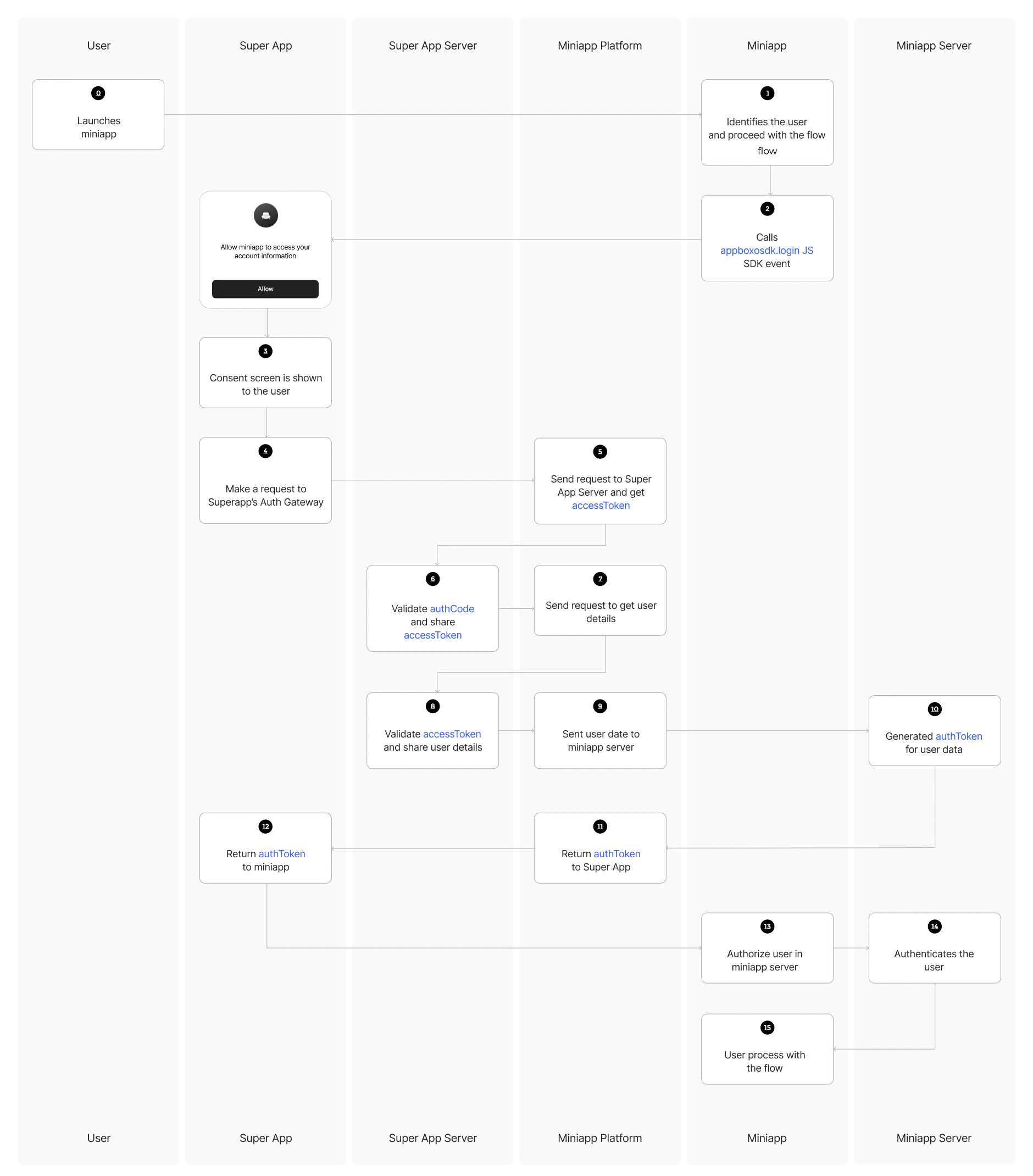 Here is the revised flow for better clarity:
**User opens host app and launches miniapp**: The user opens the host app and starts the miniapp.
**User should be identified to proceed with the flow**: This could involve product purchase, user registration, etc.
**`appboxo.login()` is called from inside the miniapp**: The miniapp requests a login action via Boxo's SDK.
**User is asked for confirmation to give access to personal data**: The user is prompted to confirm sharing personal data necessary for the miniapp's authorization process.
**Boxo's native SDK gets the auth code generated by the host app**: Boxo SDK receives the authorization code and sends an HTTPS request to the Boxo platform with the auth code.
**Boxo's platform sends an HTTPS request to the host app backend**: The Boxo platform sends the auth code to the host app's backend for validation.
**Host app backend validates the auth code and returns an access token**: The backend checks the auth code and sends back an access token.
**Boxo's platform sends an HTTPS request to the host app backend to get user data**: The Boxo platform requests the user data from the host app backend using the access token.
**Host app backend validates the access token and returns user data**: The host app backend confirms the validity of the access token and sends the user data back.
**Boxo's platform sends an HTTPS request with the user data to the miniapp backend**: Boxo platform forwards the user data to the miniapp backend for processing.
**Miniapp backend either registers a new user or identifies an existing one**: The miniapp backend registers the user or identifies the existing user, then sends an authorization token back to Boxo platform.
**Boxo platform sends back the authorization token to the Boxo native SDK**: The authorization token is sent back to the Boxo SDK that initiated the request.
**Authorization token is passed to the miniapp**: The token is provided to the miniapp.
**Miniapp makes a request with the token to get user data from the miniapp backend**: The miniapp sends the token to its backend for user data.
**Miniapp backend recognizes the token and sends back user data**: The miniapp backend verifies the token and returns the user data.
**User is authorized and continues with the miniapp flow**: The user is successfully authorized and can proceed with using the miniapp.
This process ensures a secure and seamless flow for user authorization between the host app, Boxo platform, and miniapp.
Note: Feature must be enabled in [Dashboard Partnership](https://dashboard.boxo.io/partnerships/)
Here is the revised flow for better clarity:
**User opens host app and launches miniapp**: The user opens the host app and starts the miniapp.
**User should be identified to proceed with the flow**: This could involve product purchase, user registration, etc.
**`appboxo.login()` is called from inside the miniapp**: The miniapp requests a login action via Boxo's SDK.
**User is asked for confirmation to give access to personal data**: The user is prompted to confirm sharing personal data necessary for the miniapp's authorization process.
**Boxo's native SDK gets the auth code generated by the host app**: Boxo SDK receives the authorization code and sends an HTTPS request to the Boxo platform with the auth code.
**Boxo's platform sends an HTTPS request to the host app backend**: The Boxo platform sends the auth code to the host app's backend for validation.
**Host app backend validates the auth code and returns an access token**: The backend checks the auth code and sends back an access token.
**Boxo's platform sends an HTTPS request to the host app backend to get user data**: The Boxo platform requests the user data from the host app backend using the access token.
**Host app backend validates the access token and returns user data**: The host app backend confirms the validity of the access token and sends the user data back.
**Boxo's platform sends an HTTPS request with the user data to the miniapp backend**: Boxo platform forwards the user data to the miniapp backend for processing.
**Miniapp backend either registers a new user or identifies an existing one**: The miniapp backend registers the user or identifies the existing user, then sends an authorization token back to Boxo platform.
**Boxo platform sends back the authorization token to the Boxo native SDK**: The authorization token is sent back to the Boxo SDK that initiated the request.
**Authorization token is passed to the miniapp**: The token is provided to the miniapp.
**Miniapp makes a request with the token to get user data from the miniapp backend**: The miniapp sends the token to its backend for user data.
**Miniapp backend recognizes the token and sends back user data**: The miniapp backend verifies the token and returns the user data.
**User is authorized and continues with the miniapp flow**: The user is successfully authorized and can proceed with using the miniapp.
This process ensures a secure and seamless flow for user authorization between the host app, Boxo platform, and miniapp.
Note: Feature must be enabled in [Dashboard Partnership](https://dashboard.boxo.io/partnerships/)
 This endpoint is for the Boxo platform to send user data along with miniapp credentials and receive an authorization token in return.
**URL and METHOD:**
* This endpoint must handle a HTTPS POST request
* URL to endpoint must be provided in [Dashboard](https://dashboard.boxo.io/miniapps)
This endpoint is for the Boxo platform to send user data along with miniapp credentials and receive an authorization token in return.
**URL and METHOD:**
* This endpoint must handle a HTTPS POST request
* URL to endpoint must be provided in [Dashboard](https://dashboard.boxo.io/miniapps)
 **Headers**
| Key | Value | | | |
| :-----------------: | :------------------------------------------: | - | - | - |
| Authorization | Basic ` ` | | | |
| X-Hostapp-Client-ID | `` | | | |
| X-Miniapp-App-ID | `` | | | |
**Body:**
| Field | Data type | Description | | |
| :----------------: | :---------: | :----------------------------------------: | - | - |
| reference | String(100) | Reference to user in Hostapp Server | | |
| email | String | Verified user email address | | |
| phone | String | Verified user phone number in E.164 format | | |
| first\_name | String | User's first name | | |
| last\_name | String | User's last name | | |
| custom\_attributes | JSON | Custom attributes | | |
Response:
* Response status must be `200` in all cases
* Response body:
| | Data type | Optional | Description | | | |
| :-------------- | ------------ | -------------------------------- | ---------------------------------------------------------------------------------------------------------------------------------------------------------- | - | - | - |
| `auth_token` | String(1000) | No, except `error_code` provided | Authorization token for authenticating user in miniapp | | | |
| `refresh_token` | String(1000) | Yes | Refresh token for `auth_token` miniapp | | | |
| `error_code` | String | Yes | If some error is occured error code should be provided. Example: `{"error_code": "INVALID_USER_DATA"}` All error codes can be found [here](/miniapp/Error) | | | |
**In the backend, follow these steps:**
1. **For new users:**
* Create a new user account with the received inputs for new users. Use `reference` field as identifier.
* Ensure that the new user account is identical to the regular user accounts within your authorization system.
2. **For existing users:**
* If the user already exists in your database, generate an authorization token for the user and return it.
3. **Return the access token:**
* At the end of the login process, generate an authorization token.
* The authorization token will serve as proof that the API calls made are from a specific user.
* You can also specify the session expiry time according to your preferences.
* You can also provide `refresh_token` for the session renewal without triggering connect flow again.
Example:
```
curl --location --request POST '[YOUR_SERVER_URL]/get_auth_token/' \
--header 'Authorization: Basic {{BASE64_ENCODED_APP_ID_AND_SECRET_KEY}}' \
--header 'Content-Type: application/json' \
--data-raw '{
"reference": "{{HOSTAPP_USER_REFERENCE}}",
"email": "{{USER_EMAIL}}",
"phone": "{{USER_PHONE}}",
"first_name": "{{USER_FIRST_NAME}}"
"last_name": "{{USER_LAST_NAME}}"
}'
```
Add **Get Token URL** and **Required Fields** to miniapp settings
On the **My miniapps** page, choose the miniapp, and go to settings. Enter **Get Auth Token URL** and **Required field** in the appropriate input fields.
You can authorize users at different stages based on your miniapp's user experience. This can occur either when the miniapp is launched or during the checkout process.
When authorization is triggered, the Boxo SDK will prompt the user for permission to transfer their data from the host app to the miniapp. Once the **User** approves the request, the miniapp receives the access token, indicating that the user is successfully authorized.
```js theme={"system"}
const handleLogin = async () => {
try {
const {
// token string
token
} = await appboxo.login()
} catch (error) {
console.error(error)
// Prompt authorization failure
}
}
```
**Notice**
During successful authorization, Boxo JS SDK automatically saves a token with `ab_token` key to cookies.
Whenever you need to logout the user, you can call the `logout()` function, which will clear cookies and log out the user from the miniapp.
```js theme={"system"}
const handleLogout = async () => {
try {
await appboxo.logout()
} catch (error) {
console.error(error)
// Prompt logout failure
}
}
```
You can secure the connection with the following methods.
**IP Filter**
You can set up an IP filter to secure the connection between Boxo and your miniapp. For security purposes, you should only accept requests from [Boxo's verified IP address](/miniapp/Security#our-ip-addresses). This ensures that the requests are coming from Boxo's trusted servers, adding an extra layer of protection to the communication.
**Authorization Header**
Boxo will send requests with a **Basic Authorization** header containing the **app\_id** and **secret\_key** provided in the Dashboard. These credentials ensure that the requests are authenticated and that only authorized applications can access the resources within the miniapp.
**Headers**
| Key | Value | | | |
| :-----------------: | :------------------------------------------: | - | - | - |
| Authorization | Basic ` ` | | | |
| X-Hostapp-Client-ID | `` | | | |
| X-Miniapp-App-ID | `` | | | |
**Body:**
| Field | Data type | Description | | |
| :----------------: | :---------: | :----------------------------------------: | - | - |
| reference | String(100) | Reference to user in Hostapp Server | | |
| email | String | Verified user email address | | |
| phone | String | Verified user phone number in E.164 format | | |
| first\_name | String | User's first name | | |
| last\_name | String | User's last name | | |
| custom\_attributes | JSON | Custom attributes | | |
Response:
* Response status must be `200` in all cases
* Response body:
| | Data type | Optional | Description | | | |
| :-------------- | ------------ | -------------------------------- | ---------------------------------------------------------------------------------------------------------------------------------------------------------- | - | - | - |
| `auth_token` | String(1000) | No, except `error_code` provided | Authorization token for authenticating user in miniapp | | | |
| `refresh_token` | String(1000) | Yes | Refresh token for `auth_token` miniapp | | | |
| `error_code` | String | Yes | If some error is occured error code should be provided. Example: `{"error_code": "INVALID_USER_DATA"}` All error codes can be found [here](/miniapp/Error) | | | |
**In the backend, follow these steps:**
1. **For new users:**
* Create a new user account with the received inputs for new users. Use `reference` field as identifier.
* Ensure that the new user account is identical to the regular user accounts within your authorization system.
2. **For existing users:**
* If the user already exists in your database, generate an authorization token for the user and return it.
3. **Return the access token:**
* At the end of the login process, generate an authorization token.
* The authorization token will serve as proof that the API calls made are from a specific user.
* You can also specify the session expiry time according to your preferences.
* You can also provide `refresh_token` for the session renewal without triggering connect flow again.
Example:
```
curl --location --request POST '[YOUR_SERVER_URL]/get_auth_token/' \
--header 'Authorization: Basic {{BASE64_ENCODED_APP_ID_AND_SECRET_KEY}}' \
--header 'Content-Type: application/json' \
--data-raw '{
"reference": "{{HOSTAPP_USER_REFERENCE}}",
"email": "{{USER_EMAIL}}",
"phone": "{{USER_PHONE}}",
"first_name": "{{USER_FIRST_NAME}}"
"last_name": "{{USER_LAST_NAME}}"
}'
```
Add **Get Token URL** and **Required Fields** to miniapp settings
On the **My miniapps** page, choose the miniapp, and go to settings. Enter **Get Auth Token URL** and **Required field** in the appropriate input fields.
You can authorize users at different stages based on your miniapp's user experience. This can occur either when the miniapp is launched or during the checkout process.
When authorization is triggered, the Boxo SDK will prompt the user for permission to transfer their data from the host app to the miniapp. Once the **User** approves the request, the miniapp receives the access token, indicating that the user is successfully authorized.
```js theme={"system"}
const handleLogin = async () => {
try {
const {
// token string
token
} = await appboxo.login()
} catch (error) {
console.error(error)
// Prompt authorization failure
}
}
```
**Notice**
During successful authorization, Boxo JS SDK automatically saves a token with `ab_token` key to cookies.
Whenever you need to logout the user, you can call the `logout()` function, which will clear cookies and log out the user from the miniapp.
```js theme={"system"}
const handleLogout = async () => {
try {
await appboxo.logout()
} catch (error) {
console.error(error)
// Prompt logout failure
}
}
```
You can secure the connection with the following methods.
**IP Filter**
You can set up an IP filter to secure the connection between Boxo and your miniapp. For security purposes, you should only accept requests from [Boxo's verified IP address](/miniapp/Security#our-ip-addresses). This ensures that the requests are coming from Boxo's trusted servers, adding an extra layer of protection to the communication.
**Authorization Header**
Boxo will send requests with a **Basic Authorization** header containing the **app\_id** and **secret\_key** provided in the Dashboard. These credentials ensure that the requests are authenticated and that only authorized applications can access the resources within the miniapp.