> ## Documentation Index
> Fetch the complete documentation index at: https://boxo.mintlify.site/llms.txt
> Use this file to discover all available pages before exploring further.
# Boxo Payments
## Introduction
Boxo Payments is an integrated in-app payment solution that enables users of host apps to securely make payments for orders directly within a miniapp. By leveraging the Boxo platform, it simplifies the payment process, allowing users to complete transactions seamlessly without leaving the host app environment. This functionality ensures a smooth and secure payment experience for users, while providing miniapp developers with an easy-to-integrate solution for handling payments within their services.
Here is diagram showcasing the payment of miniapp's order with the host app's payment system
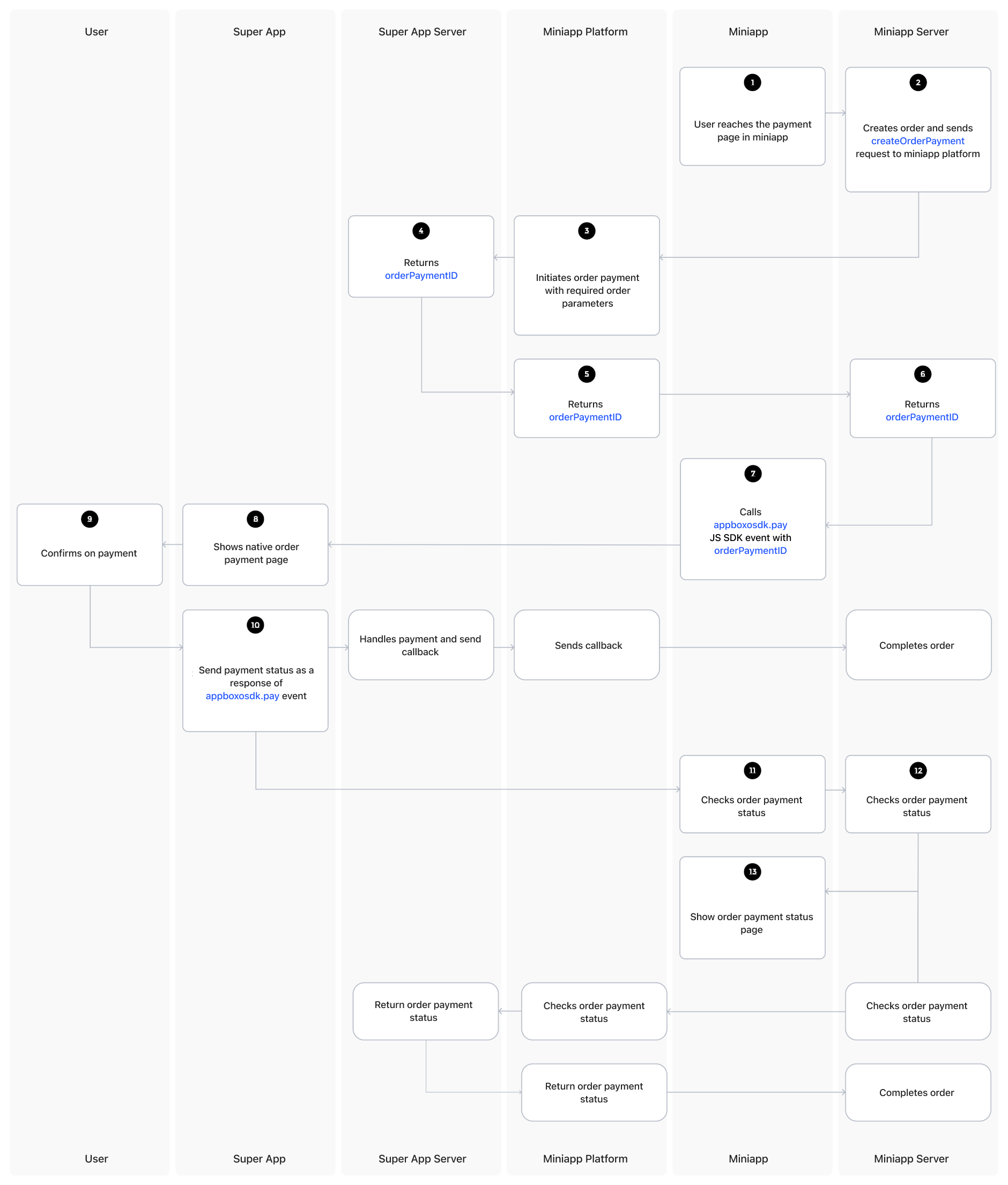 Here is the streamlined process for handling payment in a Boxo Miniapp:
**User reaches the payment page** in the Miniapp and proceeds to create an order.
**Miniapp server** creates the order and sends a `createOrderPayment` request to the Boxo Platform.
**Boxo Platform** initiates the payment request on the **Host app server**.
**Host app server** returns the `orderPaymentID` to the **Boxo Platform**.
**Boxo Platform** returns the `orderPaymentID` to the **Miniapp server**.
**Miniapp server** sends the `orderPaymentID` to the **Miniapp**.
The **Miniapp** passes the `orderPaymentID` to the Boxo JS SDK `pay` method.
The **Boxo Native SDK** listens for the `pay` event triggered by the Boxo JS SDK and displays the payment confirmation page to the user.
**User confirms the payment** on the payment confirmation page.
The **Host app** handles the payment and sends the payment status back to the Boxo JS SDK `pay` event.
* During payment processing, the **Host app server** sends a callback to the **Boxo Platform** to update the order in the **Miniapp backend**.
The **Miniapp** handles the payment status event from the Boxo JS SDK and updates the order payment status in the **Miniapp server**.
**Miniapp** confirms the order payment status.
* If the order is still processing, the **Miniapp** will request the payment status from the **Boxo Platform**, which in turn will request the payment status from the **Host app server**.
Finally, the **Miniapp** shows the **order payment status** page to the user.
Note: Feature must be enabled in [Dashboard Partnership](https://dashboard.boxo.io/partnerships/)
Here is the streamlined process for handling payment in a Boxo Miniapp:
**User reaches the payment page** in the Miniapp and proceeds to create an order.
**Miniapp server** creates the order and sends a `createOrderPayment` request to the Boxo Platform.
**Boxo Platform** initiates the payment request on the **Host app server**.
**Host app server** returns the `orderPaymentID` to the **Boxo Platform**.
**Boxo Platform** returns the `orderPaymentID` to the **Miniapp server**.
**Miniapp server** sends the `orderPaymentID` to the **Miniapp**.
The **Miniapp** passes the `orderPaymentID` to the Boxo JS SDK `pay` method.
The **Boxo Native SDK** listens for the `pay` event triggered by the Boxo JS SDK and displays the payment confirmation page to the user.
**User confirms the payment** on the payment confirmation page.
The **Host app** handles the payment and sends the payment status back to the Boxo JS SDK `pay` event.
* During payment processing, the **Host app server** sends a callback to the **Boxo Platform** to update the order in the **Miniapp backend**.
The **Miniapp** handles the payment status event from the Boxo JS SDK and updates the order payment status in the **Miniapp server**.
**Miniapp** confirms the order payment status.
* If the order is still processing, the **Miniapp** will request the payment status from the **Boxo Platform**, which in turn will request the payment status from the **Host app server**.
Finally, the **Miniapp** shows the **order payment status** page to the user.
Note: Feature must be enabled in [Dashboard Partnership](https://dashboard.boxo.io/partnerships/)
 **Data format**
Currently, the Boxo platform uses JSON format for data exchange. When working with decimals, they are represented as either float, number, or string, with a maximum of 20 digits and 2 digits after the decimal point. Additionally, the data type definitions include limits on the size of strings, ensuring consistent and manageable data structures across systems.
This endpoint is on Boxo platform. Send request to create order payment (see step 2 in diagram).
**URL and METHOD:**
This is HTTPS POST `/api/v1/orders/create-order-payment/` endpoint
IP address of requesting services must be provided in [Dashboard](https://dashboard.boxo.io/miniapps/) for whitelisting or [Request Signaturing](/miniapp/Signaturing) must be enabled
**Headers**
| Key | Value |
| :----------: | :----------------: |
| Content-type | `application/json` |
**Body:**
| Field | Data type | Optional | Description |
| :--------: | :----------: | :------: | :------------------------------------: |
| app\_id | String | No | Miniapp identifier |
| client\_id | String | No | Hostapp identifier |
| order | OrderDetails | No | Order info (amount, currency and etc.) |
Here is the data for **OrderDetails**, **OrderItem**, and **OrderShippingAddress** in a clean, well-structured format:
**OrderDetails**
| Field | Data Type | Optional | Description |
| ------------------- | -------------------- | -------- | ------------------------------------ |
| `currency` | String(20) | No | Order amount currency |
| `amount` | Decimal | No | Order amount |
| `subtotal_amount` | Decimal | Yes | Subtotal amount of the order |
| `shipping_amount` | Decimal | Yes | Shipping cost |
| `discount_amount` | Decimal | Yes | Discount applied on the order |
| `tax_title` | String(250) | Yes | Title of the tax applied |
| `tax_amount` | Decimal | Yes | Tax amount |
| `taxes_included` | Bool | Yes | Indicates whether taxes are included |
| `note` | String | Yes | Additional notes for the order |
| `miniapp_order_id` | String(250) | Yes | Order reference in the miniapp |
| `hostapp_user_id` | String(250) | Yes | User reference in the host app |
| `items` | OrderItem\[] | Yes | List of items purchased in the order |
| `shipping_address` | OrderShippingAddress | Yes | Shipping address information |
| `custom_attributes` | JSON | Yes | Custom attributes for the order |
***
**OrderItem**
| Field | Data Type | Optional | Description |
| ---------------------- | ----------- | -------- | ------------------------------------ |
| `product_name` | String(250) | Yes | Name of the product |
| `product_variant_name` | String(250) | Yes | Name of the product variant |
| `product_sku` | String(250) | Yes | Product SKU |
| `product_image_url` | String(250) | Yes | URL of the product image |
| `quantity` | Integer | Yes | Quantity of the product in the order |
| `price` | Decimal | Yes | Price of the product |
| `discount` | Decimal | Yes | Discount applied to the product |
***
**OrderShippingAddress**
| Field | Data Type | Optional | Description |
| --------------- | ------------ | -------- | --------------------------------------------------------------------- |
| `address1` | String(1000) | Yes | Address line 1 |
| `address2` | String(1000) | Yes | Address line 2 |
| `first_name` | String(250) | Yes | First name of the recipient |
| `last_name` | String(250) | Yes | Last name of the recipient |
| `phone` | String(250) | Yes | Phone number of the recipient |
| `region_name` | String(100) | Yes | Name of the region or state |
| `region_code` | String(100) | Yes | Code of the region or state |
| `province_name` | String(250) | Yes | Name of the province |
| `province_code` | String(250) | Yes | Code of the province |
| `city` | String(250) | Yes | City of the recipient |
| `country` | String(250) | Yes | Country of the recipient |
| `postal_code` | String(250) | Yes | Postal code of the recipient |
| `latitude` | Decimal | Yes | Latitude of the shipping address (up to 15 digits after the decimal) |
| `longitude` | Decimal | Yes | Longitude of the shipping address (up to 15 digits after the decimal) |
***
**Decimal Limits for Coordinates:**
* **Latitude**: Max value: 90, Min value: -90, max 17 digits with 15 digits after the decimal point.
* **Longitude**: Max value: 180, Min value: -180, max 18 digits with 15 digits after the decimal point.
**Response:**
* Response status will be `400` in case there is error\_code
* **Response body:**
| Field | Data type | Optional | Description |
| :----------------: | :---------: | :------: | :---------------------------------------------------------------------------------------------------------------------------------------------------------: |
| order\_payment\_id | String(250) | Yes | Order payment identifier |
| error\_code | String | Yes | If some error is occured error code should be provided. Example: `{"error_code": "INVALID_ORDER_DATA"}` All error codes can be found [here](/miniapp/Error) |
**Request Example:**
```
curl --location --request POST '[BOXO_PLATFORM_SERVER_URL]/api/v1/orders/create-order-payment/'\
--header 'Content-Type: application/json' \
--header 'Authorization: Basic {{BASE64_ENCODED_CLIENT_ID_AND_CLIENT_SECRET}}' \
--data-raw '{
"app_id": "{{MINIAPP_ID}}",
"client_id": "{{CLIENT_ID}}",
"order": {
"amount": "100.00",
"currency": "USD",
"miniapp_order_id": "{{ MINIAPP_ORDER_ID }}",
"hostapp_user_id": "{{ HOSTAPP_USER_ID }}"
}
}'
```
**Response Example:**
```
{
"order_payment_id": "8X566iHGnpUxHXPX3FH0iDsXUVn9ku16xJGQ"
}
```
```
{
"error_code": "UNKNOWN_ERROR",
"error_message": "Unknown error. Please try again later."
}
```
This endpoint is on Boxo platform. Send request to get order payment status (see "Check order status" step in diagram).
**URL and METHOD:**
This is HTTPS POST `/api/v1/orders/get-payment-status/` endpoint
IP address of requesting services must be provided in [Dashboard](https://dashboard.boxo.io/miniapps/) for whitelisting or [Request Signaturing](/miniapp/Signaturing) must be enabled
**Headers:**
| Key | Value |
| :----------: | :--------------: |
| Content-type | application/json |
**Body:**
| Field | Data type | Optional | Description |
| :----------------: | :---------: | :------: | :----------------------: |
| app\_id | String | No | Miniapp identifier |
| client\_id | String | No | Hostapp identifier |
| order\_payment\_id | String(250) | No | Order payment identifier |
**Response:**
* Response status will be
`400`
in case there is error\_code
* Response body:
| Field | Data type | Description |
| :-------------------: | :-------: | :----------------------------------------------------------------------------------------------------------: |
| order\_payment\_id | String | Order payment identifier |
| app\_id | String | Miniapp identifier |
| client\_id | String | Hostapp identifier |
| payment\_status | String | Order payment status: `in_process\| paid\| cancelled \|failed ` |
| payment\_fail\_reason | String | Order payment fail reason |
| error\_code | String | Error code. Example: `{"error_code": "ORDER_NOT_FOUND"}` All error codes can be found [here](/miniapp/Error) |
**Request Example**
```
curl --location --request POST '[BOXO_PLATFORM_SERVER_URL]/api/v1/orders/get-payment-status/'\
--header 'Content-Type: application/json' \
--data-raw '{
"app_id": "{{MINIAPP_ID}}",
"client_id": "{{CLIENT_ID}}",
"order_payment_id": "{{ORDER_PAYMENT_ID}}"
}'
```
```
{
"order_payment_id": "{{ORDER_PAYMENT_ID}}",
"app_id": "{{MINIAPP_ID}}",
"client_id": "{{CLIENT_ID}}",
"payment_status": "failed",
"payment_fail_reason": "Payment amount exceeds user's amount limit."
}
```
```
{
"error_code": "ORDER_NOT_FOUND",
"error_message": "No Order matches the given query."
}
```
Setup this endpoint for Boxo platform to complete order payment(see step after 10 in diagram).
**URL and METHOD:**
This endpoint must handle a HTTPS POST request
URL to endpoint must be provided in [Dashboard](https://dashboard.boxo.io/miniapps/)
**Data format**
Currently, the Boxo platform uses JSON format for data exchange. When working with decimals, they are represented as either float, number, or string, with a maximum of 20 digits and 2 digits after the decimal point. Additionally, the data type definitions include limits on the size of strings, ensuring consistent and manageable data structures across systems.
This endpoint is on Boxo platform. Send request to create order payment (see step 2 in diagram).
**URL and METHOD:**
This is HTTPS POST `/api/v1/orders/create-order-payment/` endpoint
IP address of requesting services must be provided in [Dashboard](https://dashboard.boxo.io/miniapps/) for whitelisting or [Request Signaturing](/miniapp/Signaturing) must be enabled
**Headers**
| Key | Value |
| :----------: | :----------------: |
| Content-type | `application/json` |
**Body:**
| Field | Data type | Optional | Description |
| :--------: | :----------: | :------: | :------------------------------------: |
| app\_id | String | No | Miniapp identifier |
| client\_id | String | No | Hostapp identifier |
| order | OrderDetails | No | Order info (amount, currency and etc.) |
Here is the data for **OrderDetails**, **OrderItem**, and **OrderShippingAddress** in a clean, well-structured format:
**OrderDetails**
| Field | Data Type | Optional | Description |
| ------------------- | -------------------- | -------- | ------------------------------------ |
| `currency` | String(20) | No | Order amount currency |
| `amount` | Decimal | No | Order amount |
| `subtotal_amount` | Decimal | Yes | Subtotal amount of the order |
| `shipping_amount` | Decimal | Yes | Shipping cost |
| `discount_amount` | Decimal | Yes | Discount applied on the order |
| `tax_title` | String(250) | Yes | Title of the tax applied |
| `tax_amount` | Decimal | Yes | Tax amount |
| `taxes_included` | Bool | Yes | Indicates whether taxes are included |
| `note` | String | Yes | Additional notes for the order |
| `miniapp_order_id` | String(250) | Yes | Order reference in the miniapp |
| `hostapp_user_id` | String(250) | Yes | User reference in the host app |
| `items` | OrderItem\[] | Yes | List of items purchased in the order |
| `shipping_address` | OrderShippingAddress | Yes | Shipping address information |
| `custom_attributes` | JSON | Yes | Custom attributes for the order |
***
**OrderItem**
| Field | Data Type | Optional | Description |
| ---------------------- | ----------- | -------- | ------------------------------------ |
| `product_name` | String(250) | Yes | Name of the product |
| `product_variant_name` | String(250) | Yes | Name of the product variant |
| `product_sku` | String(250) | Yes | Product SKU |
| `product_image_url` | String(250) | Yes | URL of the product image |
| `quantity` | Integer | Yes | Quantity of the product in the order |
| `price` | Decimal | Yes | Price of the product |
| `discount` | Decimal | Yes | Discount applied to the product |
***
**OrderShippingAddress**
| Field | Data Type | Optional | Description |
| --------------- | ------------ | -------- | --------------------------------------------------------------------- |
| `address1` | String(1000) | Yes | Address line 1 |
| `address2` | String(1000) | Yes | Address line 2 |
| `first_name` | String(250) | Yes | First name of the recipient |
| `last_name` | String(250) | Yes | Last name of the recipient |
| `phone` | String(250) | Yes | Phone number of the recipient |
| `region_name` | String(100) | Yes | Name of the region or state |
| `region_code` | String(100) | Yes | Code of the region or state |
| `province_name` | String(250) | Yes | Name of the province |
| `province_code` | String(250) | Yes | Code of the province |
| `city` | String(250) | Yes | City of the recipient |
| `country` | String(250) | Yes | Country of the recipient |
| `postal_code` | String(250) | Yes | Postal code of the recipient |
| `latitude` | Decimal | Yes | Latitude of the shipping address (up to 15 digits after the decimal) |
| `longitude` | Decimal | Yes | Longitude of the shipping address (up to 15 digits after the decimal) |
***
**Decimal Limits for Coordinates:**
* **Latitude**: Max value: 90, Min value: -90, max 17 digits with 15 digits after the decimal point.
* **Longitude**: Max value: 180, Min value: -180, max 18 digits with 15 digits after the decimal point.
**Response:**
* Response status will be `400` in case there is error\_code
* **Response body:**
| Field | Data type | Optional | Description |
| :----------------: | :---------: | :------: | :---------------------------------------------------------------------------------------------------------------------------------------------------------: |
| order\_payment\_id | String(250) | Yes | Order payment identifier |
| error\_code | String | Yes | If some error is occured error code should be provided. Example: `{"error_code": "INVALID_ORDER_DATA"}` All error codes can be found [here](/miniapp/Error) |
**Request Example:**
```
curl --location --request POST '[BOXO_PLATFORM_SERVER_URL]/api/v1/orders/create-order-payment/'\
--header 'Content-Type: application/json' \
--header 'Authorization: Basic {{BASE64_ENCODED_CLIENT_ID_AND_CLIENT_SECRET}}' \
--data-raw '{
"app_id": "{{MINIAPP_ID}}",
"client_id": "{{CLIENT_ID}}",
"order": {
"amount": "100.00",
"currency": "USD",
"miniapp_order_id": "{{ MINIAPP_ORDER_ID }}",
"hostapp_user_id": "{{ HOSTAPP_USER_ID }}"
}
}'
```
**Response Example:**
```
{
"order_payment_id": "8X566iHGnpUxHXPX3FH0iDsXUVn9ku16xJGQ"
}
```
```
{
"error_code": "UNKNOWN_ERROR",
"error_message": "Unknown error. Please try again later."
}
```
This endpoint is on Boxo platform. Send request to get order payment status (see "Check order status" step in diagram).
**URL and METHOD:**
This is HTTPS POST `/api/v1/orders/get-payment-status/` endpoint
IP address of requesting services must be provided in [Dashboard](https://dashboard.boxo.io/miniapps/) for whitelisting or [Request Signaturing](/miniapp/Signaturing) must be enabled
**Headers:**
| Key | Value |
| :----------: | :--------------: |
| Content-type | application/json |
**Body:**
| Field | Data type | Optional | Description |
| :----------------: | :---------: | :------: | :----------------------: |
| app\_id | String | No | Miniapp identifier |
| client\_id | String | No | Hostapp identifier |
| order\_payment\_id | String(250) | No | Order payment identifier |
**Response:**
* Response status will be
`400`
in case there is error\_code
* Response body:
| Field | Data type | Description |
| :-------------------: | :-------: | :----------------------------------------------------------------------------------------------------------: |
| order\_payment\_id | String | Order payment identifier |
| app\_id | String | Miniapp identifier |
| client\_id | String | Hostapp identifier |
| payment\_status | String | Order payment status: `in_process\| paid\| cancelled \|failed ` |
| payment\_fail\_reason | String | Order payment fail reason |
| error\_code | String | Error code. Example: `{"error_code": "ORDER_NOT_FOUND"}` All error codes can be found [here](/miniapp/Error) |
**Request Example**
```
curl --location --request POST '[BOXO_PLATFORM_SERVER_URL]/api/v1/orders/get-payment-status/'\
--header 'Content-Type: application/json' \
--data-raw '{
"app_id": "{{MINIAPP_ID}}",
"client_id": "{{CLIENT_ID}}",
"order_payment_id": "{{ORDER_PAYMENT_ID}}"
}'
```
```
{
"order_payment_id": "{{ORDER_PAYMENT_ID}}",
"app_id": "{{MINIAPP_ID}}",
"client_id": "{{CLIENT_ID}}",
"payment_status": "failed",
"payment_fail_reason": "Payment amount exceeds user's amount limit."
}
```
```
{
"error_code": "ORDER_NOT_FOUND",
"error_message": "No Order matches the given query."
}
```
Setup this endpoint for Boxo platform to complete order payment(see step after 10 in diagram).
**URL and METHOD:**
This endpoint must handle a HTTPS POST request
URL to endpoint must be provided in [Dashboard](https://dashboard.boxo.io/miniapps/)
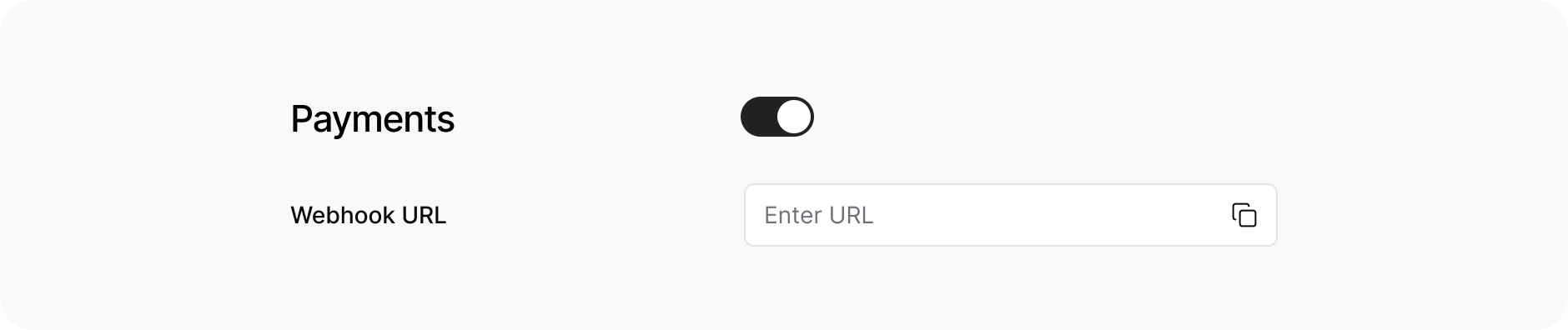 * We suggest to whitelist our IP addresses for this endpoint.
**Headers:**
| Key | Value |
| :-----------: | :-----------------------------------------: |
| Authorization | Basic `` |
| Content-type | `application/json` |
`app_id` and `secret_key` will be provided in [Dashboard](https://dashboard.boxo.io/miniapps/)
**Body:**
| Field | Data type | Description |
| :-------------------------: | :---------: | :------------------------------------------------------------: |
| miniapp\_order\_id | String(250) | Miniapp order indentifier |
| hostapp\_order\_payment\_id | String(250) | Order payment identifier |
| hostapp\_client\_id | String(250) | Hostapp identifier |
| payment\_status | String | Order payment status: `in_process\| paid\| cancelled\| failed` |
| payment\_fail\_reason | String | Order payment fail reason |
| custom\_attributes | JSON | Order custom attributes |
**Response:**
* Response status must be
`200`
in all cases
* Response body:
| Field | Data type | Description |
| :---------: | :-------: | :------------------------------------: |
| code | String | Request result code example: `SUCCESS` |
| error\_code | String | Error code |
**Request Example:**
```
curl --location --request POST '[YOUR_SERVER_URL]/api/complete-order/' \
--header 'Authorization: Basic {{BASE64_ENCODED_APP_ID_AND_SECRET_KEY}}' \
--header 'Content-Type: application/json' \
--data-raw '{
"miniapp_order_id": "{{MINIAPP_ORDER_ID}}",
"hostapp_client_id": "{{CLIENT_ID}}",
"hostapp_order_payment_id": "{{ORDER_PAYMENT_ID}}",
"payment_status": "paid"
}'
```
**Response Example:**
```
{
"code": "SUCCESS"
}
```
```
{
"error_code": "ORDER_NOT_FOUND"
}
```
When the order is created payment should be handled on host app's side. Use `appboxoSdk.pay` method as in example to open payment pages on host app.
```
const payResponse = await appboxoSdk.pay({
amount,
currency,
miniappOrderId, // order reference
orderPaymentId, // pass order_payment_id
extraParams: {},
})
const { status } = payResponse
```
* We suggest to whitelist our IP addresses for this endpoint.
**Headers:**
| Key | Value |
| :-----------: | :-----------------------------------------: |
| Authorization | Basic `` |
| Content-type | `application/json` |
`app_id` and `secret_key` will be provided in [Dashboard](https://dashboard.boxo.io/miniapps/)
**Body:**
| Field | Data type | Description |
| :-------------------------: | :---------: | :------------------------------------------------------------: |
| miniapp\_order\_id | String(250) | Miniapp order indentifier |
| hostapp\_order\_payment\_id | String(250) | Order payment identifier |
| hostapp\_client\_id | String(250) | Hostapp identifier |
| payment\_status | String | Order payment status: `in_process\| paid\| cancelled\| failed` |
| payment\_fail\_reason | String | Order payment fail reason |
| custom\_attributes | JSON | Order custom attributes |
**Response:**
* Response status must be
`200`
in all cases
* Response body:
| Field | Data type | Description |
| :---------: | :-------: | :------------------------------------: |
| code | String | Request result code example: `SUCCESS` |
| error\_code | String | Error code |
**Request Example:**
```
curl --location --request POST '[YOUR_SERVER_URL]/api/complete-order/' \
--header 'Authorization: Basic {{BASE64_ENCODED_APP_ID_AND_SECRET_KEY}}' \
--header 'Content-Type: application/json' \
--data-raw '{
"miniapp_order_id": "{{MINIAPP_ORDER_ID}}",
"hostapp_client_id": "{{CLIENT_ID}}",
"hostapp_order_payment_id": "{{ORDER_PAYMENT_ID}}",
"payment_status": "paid"
}'
```
**Response Example:**
```
{
"code": "SUCCESS"
}
```
```
{
"error_code": "ORDER_NOT_FOUND"
}
```
When the order is created payment should be handled on host app's side. Use `appboxoSdk.pay` method as in example to open payment pages on host app.
```
const payResponse = await appboxoSdk.pay({
amount,
currency,
miniappOrderId, // order reference
orderPaymentId, // pass order_payment_id
extraParams: {},
})
const { status } = payResponse
```