

Authentication types
Integration calls use one of two authentication types.1. Basic authentication
This is the default. The client id is the username and the secret is the password: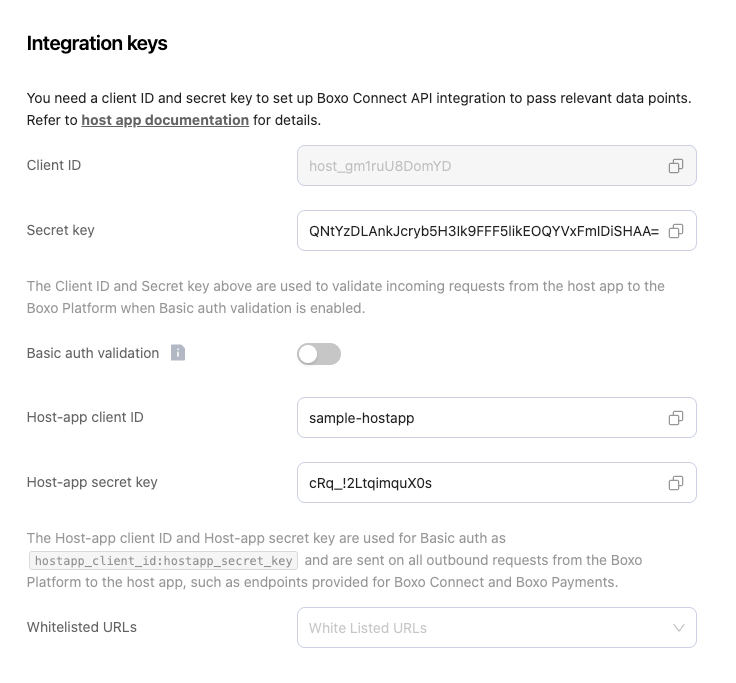
Hostapp Integration Keys
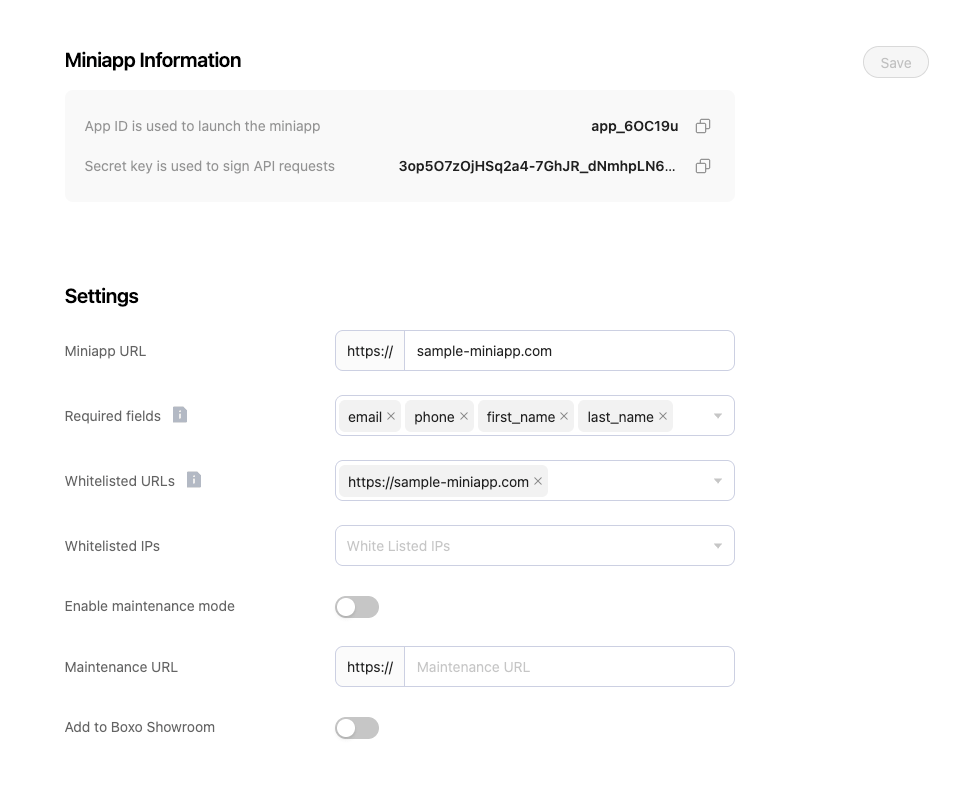
Miniapp Integration Keys
2. Request signaturing
Turn this on per app when you want a stronger check than sending the secret on every call. The sender signs the request, and the receiver verifies the signature. That confirms the caller and that the request was not changed in transit. When request signaturing is enabled for an app, it replaces Basic authentication for that app. How to set it up and verify signatures: Why Connect and Payments use it: Security measures and Miniapp security.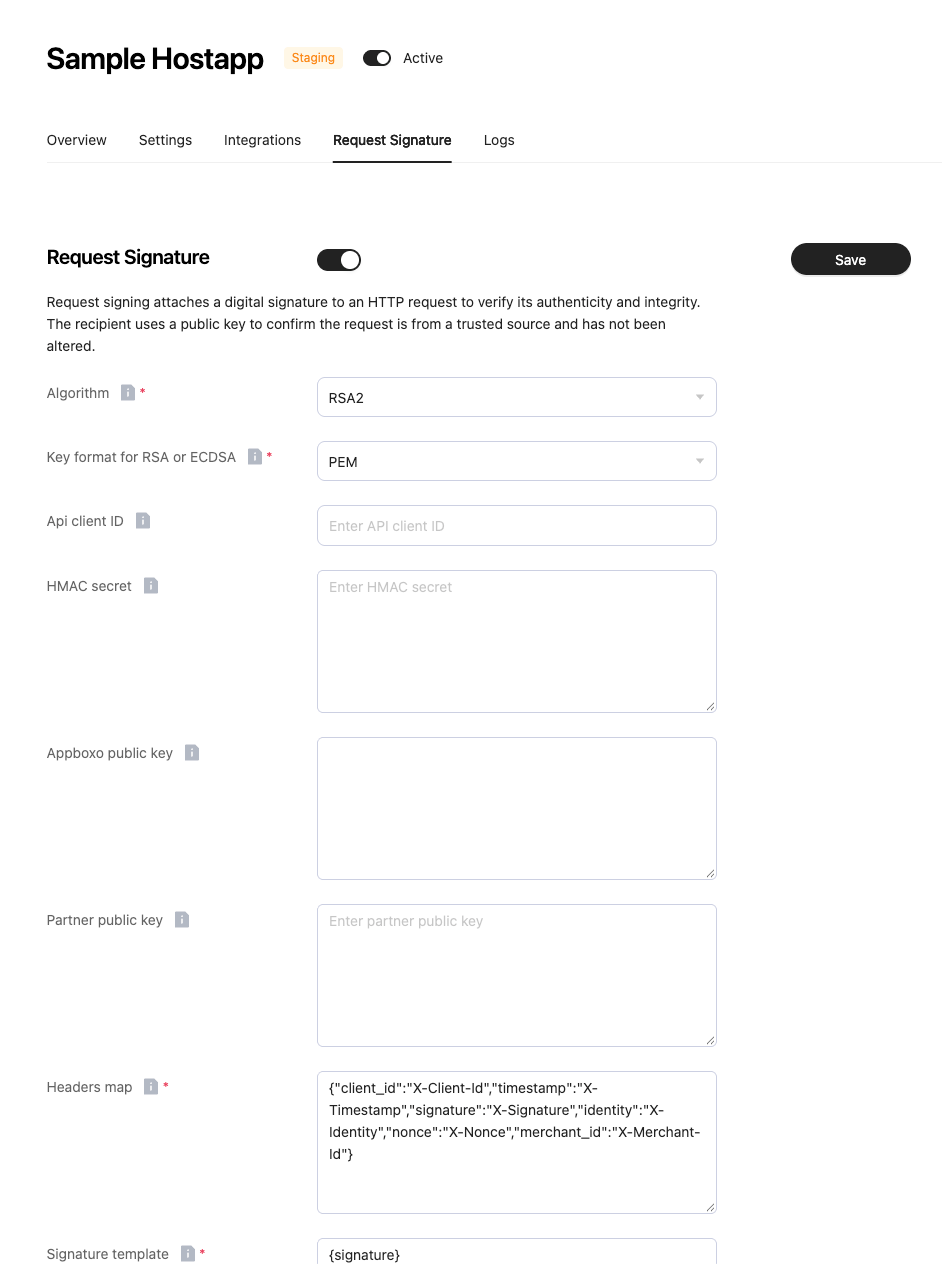
Hostapp Request Signature Configuration
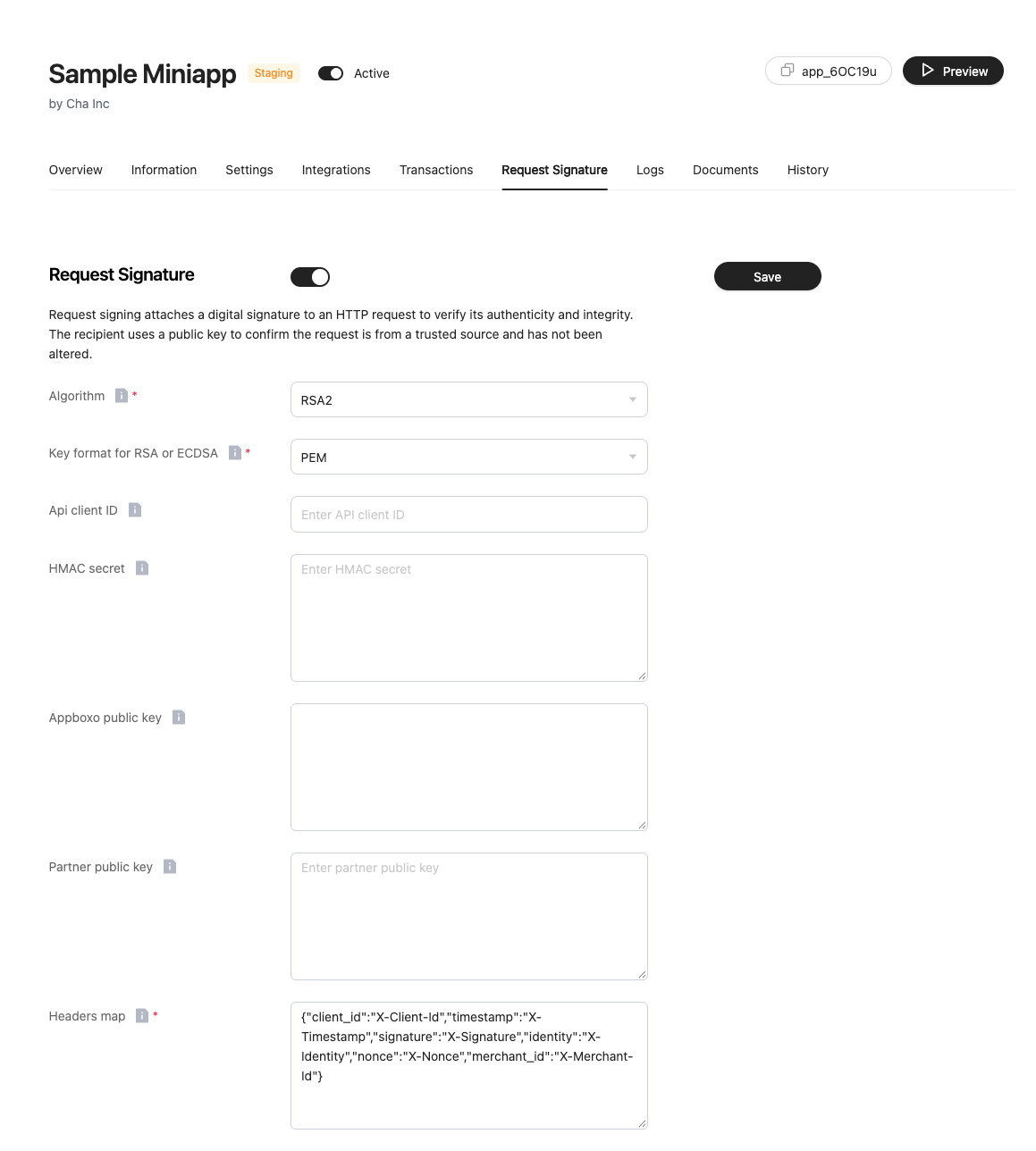
Miniapp Request Signature Configuration
Credentials
The platform issues one pair when an app is created. The hostapp issues a second pair and stores it on the platform so the platform can call the hostapp.
Client ID and App ID also name the apps. They appear in request bodies so the platform can find the integration. They are sent again on outbound calls as headers:
X-Hostapp-Client-IDis the host app Client IDX-Miniapp-App-IDis the miniapp App ID
Authorization, or in a signature.
Calls into the platform
On each protected call the platform can apply up to three checks, in this order:- Basic authentication, where that endpoint requires it.
- A request signature, when request signing is enabled for that app.
- An IP allowlist, when the app has one configured.
Hostapp Basic authentication
Turn this on with Basic auth validation on the host app. The host app then sends:
Client ID is still sent in the body of other APIs so the platform can find the host app. The Secret key is checked on the two APIs above.
Miniapp Basic authentication
POST /api/v1/analytics/miniapp-transactions/ requires Basic authentication on every call:
X-Miniapp-App-Id and the host app from X-Hostapp-Client-Id, then checks that the Basic username and password match that miniapp’s App ID and Secret key.
Request signatures
When Request Signature is enabled, the caller signs the request and the platform verifies it. Signature settings are stored per app. Host apps and miniapps each have their own. Setup for each side: What signing is for, and why Connect and Payments use it, is in Security measures and Miniapp security. Supported algorithms:
The signed string is built from the Signature payload template. The default is:
Header names, the Signature payload template, hash function, encoding, nonce, and key sorting are all configurable per app. HMAC, RSA2, and ECDSA share that template. RSA2 and ECDSA keys are PEM or DER. The Appboxo public key is what the partner uses to verify calls the platform signs.
If request signing is enabled and the signature settings are missing, the call is rejected.
IP allowlist
When IP whitelist is on, the caller’s IP must be in Whitelisted IPs. The platform’s own payment-service addresses are allowed as well. How to set the allowlist, and which platform IPs to allow on your side: Whitelisting and Security measures. Miniapps: Miniapp security.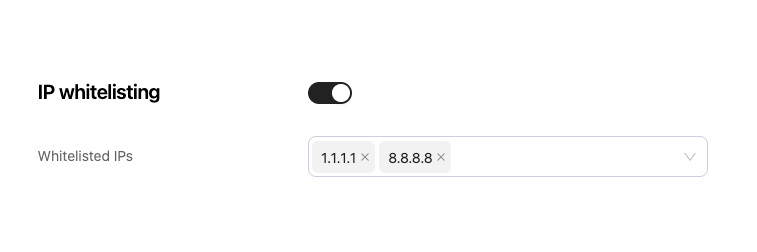
IP whitelisting
Encrypted login payload
POST /api/v1/partner/login/ takes the Client ID and a payload encrypted with AES, using the host app Secret key. The platform decrypts it, then posts the result to the miniapp. This endpoint does not use the Basic header.
Passing encrypted user data on Connect is described in Security measures.
Calls out of the platform
When the platform calls a hostapp or a miniapp, it authenticates as itself, unless the call is on behalf of a user.Basic authentication
This is the default, used when request signing is off for the app being called. Calls to the host app:X-Hostapp-Client-ID and X-Miniapp-App-ID.
Request signatures
When Request Signature is on for the app being called, the platform does not send the Basic credentials above. It sends the same style of signature headers described in the inbound section. Host apps verify those calls with the steps in Request signaturing. Miniapps use Request signaturing. Outbound RSA2 and ECDSA signatures are produced with the platform private key. HMAC signatures use the HMAC secret. The partner verifies them with the Partner public key, the Appboxo public key, or the HMAC secret, depending on the algorithm.Partner client access token
Some hostapps issue their own client access token (a client-credentials style call). When that is configured, the platform requests the token from the hostapp, then sends:Bearer is the default. The host app can return another token type. This header replaces Basic authentication and the signature Authorization value for that call. The token is cached until it expires.
User access token
Single sign-on produces a second credential: the hostapp user’s access token. The platform stores it with the user’s refresh token and uses it when the call is about that user. The header is:Token. It is configurable per host app.
A GET to the host app User data URL always uses this user token. Payment calls use it when Use access token is enabled. In that case the order includes the host app user id, and the platform also sends X-User-ID. If the host app responds with 401, the platform calls the Refresh token URL with the platform credentials, saves the new tokens, and retries once.
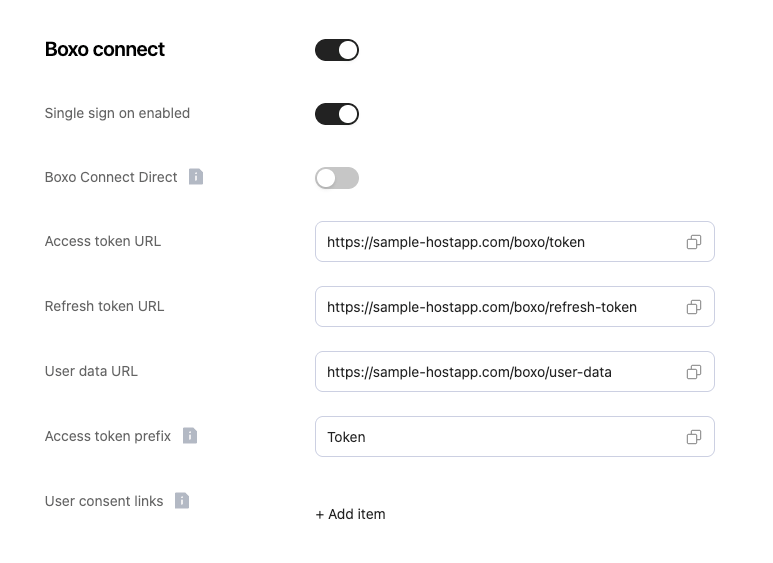
- One tells the SDK to collect consent in a popup.
- One tells the SDK that the host app completes sign-on on the server.
How the flows fit together
Single sign-on via authorize
POST /api/v1/authorize/ starts from an auth code the hostapp gave the miniapp. The product flow is Boxo Connect for host apps and Connect for miniapps.
- The caller sends the Client ID, the App ID, and an auth code. The platform finds the integration from those ids.
- The platform calls the host app Access token URL as itself, with the Host-app client ID and Host-app secret key, or with a request signature.
- The host app returns an access token and, optionally, a refresh token.
- The platform calls the host app User data URL as that user.
- The platform calls the miniapp Get auth token URL as itself, with the miniapp App ID and Secret key, or with a request signature.
- The response to the original caller is the miniapp auth token.
Single sign-on via connect
POST /api/v1/connect/ is the path where the hostapp already knows the user.
- The host app sends the Client ID, the App ID, and the user data. If Basic auth validation is on, it also sends the Client ID and Secret key. A signature and IP check apply when those are configured.
- The platform stores the user against the host app.
- The platform calls the miniapp Get auth token URL as itself and returns that miniapp token.
Create a payment
Endpoint contracts are in Boxo Payments and Payment.- The miniapp calls
POST /api/v1/orders/create-order-payment/with the Client ID and App ID. If the miniapp has Request Signature or an IP whitelist, those are checked here. - The platform calls the host app Create order payment URL. It authenticates as itself, unless Use access token is on, in which case it sends the user’s access token.
POST /api/v1/orders/get-payment-status/ follows the same split: the miniapp calls in, and the platform calls the host app Get order payment status URL with either the platform credentials or the user token.
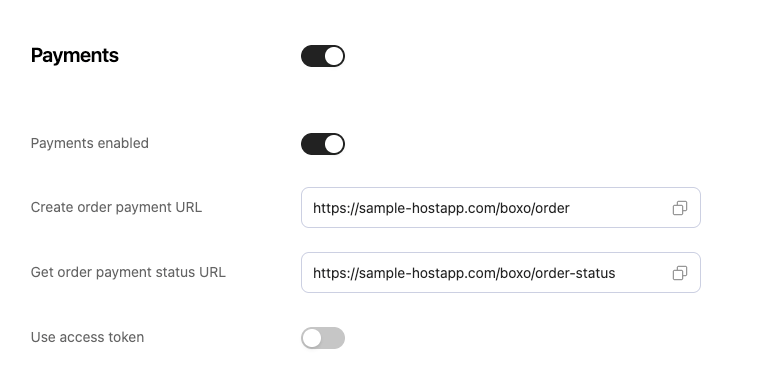
Hostapp Payment URLs
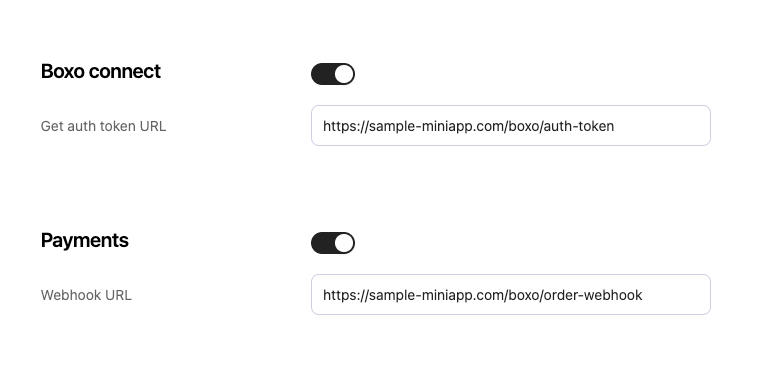
Miniapp payment and connect URLs
Complete a payment
- The hostapp calls
POST /api/v1/orders/complete-order/. Hostapp Basic authentication, the signature, and the IP allowlist apply when they are configured. - The platform calls the miniapp payment webhook as itself.
Events
POST /api/v1/events/<sender>/ accepts sender as hostapp or miniapp. The event bridge is documented in Boxo Event Bridge and Custom Events.
The inbound check on this endpoint is the miniapp’s signature and IP allowlist, for both sender values.
POST /api/v1/events/hostapp/delivers the event to the miniapp Events bridge URL.POST /api/v1/events/miniapp/delivers the event to the host app Events bridge URL.